• The APS Catalog has been deprecated and removed from all Plesk Obsidian versions.
    Applications already installed from the APS Catalog will continue working. However, Plesk will no longer provide support for APS applications.
  • Please be aware: with the Plesk Obsidian 18.0.78 release, the support for the ngx_pagespeed.so module will be deprecated and removed from the sw-nginx package.

WP Toolkit plugin spamming logs

watou

New Pleskian
Server operating system version
Ubuntu 22.04
Plesk version and microupdate number
8.0.78 Update #2
On Plesk Obsidian Web Pro Edition, Version 18.0.78 Update #2, my Wordpress sites all now have WP Toolkit on the admin menu, like it or not, but none of them actually work because of no access to the token they need to be refreshed. I say "like it or not" because I have WP admin users who should not have WP Toolkit functionality, but I see no control to take this plugin away from them, as it's not listed among the installed plugins, like it's installed "magically."

In said plugin, I receive the popup error "Plugin access token not found. Try refreshing the access token on the Setup screen of the corresponding site in the control panel interface or contact your service provider for assistance." So back in the Plesk panel, Wordpress for the domain, I go to Setup and press Refresh Access Token. I reports that it did in fact refresh the token, but back in the Wordpress admin panel, it made no difference and the plugin continues to not find the token or do anything useful. Under the ~/.wp-toolkit directory, there is a numerical directory name, perhaps the instance ID, but that directory stays empty after the so-called token refresh.

At the same time as the above unpleasant discoveries, I see my logs are all filling with variations of the message:

AH01071: Got error 'PHP message: Failed to create notifier: Failed to get apiUrl from token data'

I think these are related because of this find:


(English version: Wordpress Toolkit Zugrifsstoken nicht gefunden - netcup Community )

Is this due to a recent software update to my Plesk Obsidian Web Pro Edition, and could this be fixed fairly quickly?

Thanks and regards,
my user name
 
We ran into what appears to be the same issue and were able to isolate the cause.

In our case, the symptoms included:

  • WP Toolkit appearing in WordPress admin and reporting:
    Plugin access token not found. Try refreshing the access token on the Setup screen of the corresponding site in the control panel interface or contact your service provider for assistance.
  • Repeated Apache/PHP log entries such as:
    Failed to create notifier: Failed to get apiUrl from token data
  • Jetpack reporting "Cookie Check Failed" and being unable to reconnect.
  • Elementor and other admin functionality becoming unstable due to REST API-related issues.
Like you, refreshing the access token from WP Toolkit in Plesk reported success but did not resolve anything.

While investigating, we found that WP Toolkit had added a WP_TOOLKIT_API_TOKEN constant to wp-config.php. After decoding the JWT payload, one field immediately stood out:

{
"installationId": 109,
"apiUrl": null
}
The token contained "apiUrl": null, which appears to directly correspond to the PHP error:

Failed to get apiUrl from token data
From there, we disabled the WP Toolkit MU plugin located at:

wp-content/mu-plugins/wp-toolkit.php
After disabling that file:

  • The PHP errors stopped immediately.
  • Jetpack was able to reconnect successfully.
  • The Jetpack Cookie Check Failed error disappeared.
  • Elementor started functioning normally again.
  • REST API issues went away.
This strongly suggests that the WP Toolkit WordPress integration is receiving a malformed or incomplete token and then failing while initializing its notifier/API services.

One additional detail: because WP Toolkit is installed as a Must-Use (MU) plugin, normal WordPress troubleshooting methods don't disable it. We initially disabled all plugins via the Health Check/Troubleshooting plugin and still saw the issue because the WP Toolkit MU plugin continued loading.

Based on our testing, I suspect the issue is related to a recent WP Toolkit/Plesk update that is generating or distributing tokens with a missing apiUrl value. It may explain why refreshing the token appears successful from the Plesk interface while the WordPress-side plugin still cannot initialize properly.

Hopefully this helps narrow things down for the Plesk team. We'd be interested to know whether this is a known issue in WP Toolkit 6.x and whether there's a supported method to regenerate a valid token without disabling the MU plugin.
 
Hi @watou,

I have WP admin users who should not have WP Toolkit functionality, but I see no control to take this plugin away from them

Can you please explain your situation in more detail? As in, who are these admin users, and which functionality they should have no access to? We'd like to make sure the plugin is useful for everyone, and to provide full granularity over which plugin functionality is shown to which users, that's why I'm asking.

As for your immediate concerns:

1. You can uninstall WP Toolkit plugin from WP Toolkit interface:

1780332885084.png

2. To avoid automatic installation of plugin on new WordPress installs, make sure the following line is present in panel.ini:
installIntegrationPluginToNewSites = false

3. We were not aware of any problems related to plugin tokens until you and @SaltechDesign provided the details above (thank you both very much!). We're investigating it already -- I'll keep you posted.
 
Thank you for your reply.

1. While I can uninstall it from the WP Toolkit interface, pressing the trash can icon you circled above gives this warning: "Removing WP Toolkit plugin will disable features that depend on it (like Vulnerability Protection). This will also reduce the effectiveness of WP Toolkit itself. Are you sure you want to remove the plugin?" This does not make clear whether or not features available in the Plesk interface will be removed, or only ones in the WordPress admin interface, or from both interfaces. The message seems causes worry without clarity and on that basis discourages uninstallation that might be what the Plesk user wants.

I have customers who administer other aspects of their WP installation as WP admins, but intentionally do not have access to areas such as security vulnerabilites or other WP Toolkit features that they did not have access to before this WP Toolkit plugin was added to the WP admin toolbar. By adding this new plugin to the WP admin set of tools, my ability to partition off different areas of responsibility is impeded, and my overall workload to contend with this change is increased.

2. Based on my future understanding of answers to #1 above, this might be helpful to me. Thank you.

3. Thank you for you troubleshooting regarding the tokens and log entries, and for your future reports on this.

Kind regards.
 
@watou Thank you for the explanation, this definitely helps understand your situation better. In this case I would recommend to hide the GUI instead of uninstalling the plugin. This can be done by adding the following line to panel.ini file:
integrationPluginUiModuleEnabled = false

The plugin will continue to work (vulnerability protection, instant reaction to changes in WordPress, etc), but WP admins won't be able to access it.

I also will adjust the text of the warning to make it more clear.
 
Last edited:
@custer, do you mean integrationPluginUiModuleEnabled = false in your advice above? Currently in the panel.ini editor, it shows a value of 1 , which I suspect means true as the current value? I'd really appreciate confirmation and perhaps a more verbose instruction on how to disable the WP admin UI for this plugin.

I look forward to the clearer wording referenced, and a resolution to the problem of non-working tokens and log spam.

Kind regards.
 
@watou Yes, you are right, it should be set to false (or 0). Sorry about this! I've edited my original post to avoid confusing others.
 
Last edited:
Using the panel.ini editor extension, the end of the file now contains this heading:

[ext-wp-toolkit]
appModeFeature = on
integrationPluginUiModuleEnabled = false

and yet, on opening the WP admin interface for one of my sites, the WP Toolkit UI is still present.

Please inform me here what else must be done to achieve the results you said would occur (WP admins won't be able to access it).
 
Using the panel.ini editor extension, the end of the file now contains this heading:

[ext-wp-toolkit]
appModeFeature = on
integrationPluginUiModuleEnabled = false

and yet, on opening the WP admin interface for one of my sites, the WP Toolkit UI is still present.

Please inform me here what else must be done to achieve the results you said would occur (WP admins won't be able to access it).
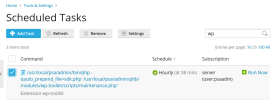
@watou The changes are applied when the hourly WP Toolkit maintenance task is executed. You can either wait for an hour and try again, or run the maintenance task manually:
1780397439697.png
 
Back
Top