• The new Python extension is now available. It allows customers to deploy and manage WSGI-based Python applications on their websites directly from Plesk.
  • The Plesk Mobile apps for iOS and Android and the Plesk Mobile Center extension have been deprecated, and are no longer available for new installations. In Plesk Obsidian 18.0.84, the Plesk Mobile Center extension will be removed from servers during the upgrade, and the Plesk Mobile apps will lose their server management features.
  • The Social Login extension has been deprecated and will be removed in Plesk Obsidian 18.0.84. After that, it will no longer be possible to log in to Plesk with a Google, Facebook, GitHub account, or with a passkey. Plesk usernames and passwords, as well as logging in with a WebPros Account, are not affected.

WP Toolkit Site Installation Stuck at 40%

andreib

New Pleskian
Server operating system version
Debian 12.7
Plesk version and microupdate number
Plesk Obsidian 18.0.66 Update #2
Hey everyone, I'm running into some issues with WP Toolkit on Plesk.

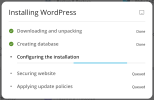
When I try to install a new WP website, the installation process gets stuck at 40%.
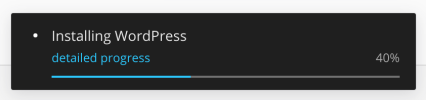
1738664697555.png
1738664710341.png

And the task is stuck in processing:
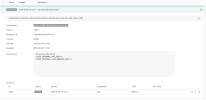
1738664758551.png

I've tried reinstalling WP Toolkit, but that didn't solve the issue.
Otherwise I'm not getting any error. It just gets stuck there.

Could anyone please help?

Thanks!!
 
Hey, thanks a lot!

These are errors from the Plesk panel log:

[2025-02-05 15:18:09.692] 2033337:67a37321a8f01 ERR [panel] Task is not responding: id=1040, pid=1600312, type=ext-wp-toolkit-task_install
[2025-02-05 15:18:09.692] 2033337:67a37321a8f01 ERR [panel] Task is not responding: id=1040, pid=1600312, type=ext-wp-toolkit-task_install, clientRemoteAddr=86.125.215.226, createdDatabaseId=27, createdDatabaseUserId=30, currentStepProgress=-1, currentStepText=, referrer=/smb/web/overview/id/31/type/domain, rollbackIsNewDirectoryCreated=, runTaskUnderLogin=admin

Thank you!
 
Hey, here is the output:
1739268061692.png

root@hosting ~ # grep -r "server reached max_children setting" /var/log/*php*-fpm* | wc -l
5

Thank you!
 
Thank you. That's unlikely to be the issue then. My other two suggestions are to:

1. Try increasing the HTTP timeout for retrieving data from wordpress.org (sec) in WordPress > Settings to something like 120. For the sake of testing only. If that doesn't help, please set it back to the original value.
2. Try the Plesk repair utility by running the following command in case there's any permission issue:

plesk repair fs

If neither works, please consider opening a support ticket for further investigation.
 
Back
Top