• The APS Catalog has been deprecated and removed from all Plesk Obsidian versions.
    Applications already installed from the APS Catalog will continue working. However, Plesk will no longer provide support for APS applications.
  • Please be aware: with the Plesk Obsidian 18.0.78 release, the support for the ngx_pagespeed.so module will be deprecated and removed from the sw-nginx package.

www word didn't make my sites work

A

amr ali

Guest
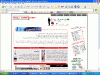
there is problem in my dns cause when i enter client site with (www) it's open but when i write without (www)it's not open like http://domain.net it's not working when i but http://www.domain.net it's working
and when he put site under him it's work without (www) it's open and when he write (www) it's not open like http://domain.com it's working but http://www.domain.com it's not working and i had attaced pic prove that so help me cause i didn't use my vps right to now and i hate that and it's not my isp cause i make it from day so it won't be the reson
 

Attachments

  • (com).gif
    (com).gif
    92.7 KB · Views: 48
  • (net).gif
    (net).gif
    80.7 KB · Views: 60
  • ww-(net).gif
    ww-(net).gif
    74.5 KB · Views: 52
  • www-(com).gif
    www-(com).gif
    80.8 KB · Views: 54
Hello,

As per the domain name I can see from the images; when I ping the domains I get following results:
==
www.domain.com pointing to xx.xx.xx.1
domain.com pointing to xx.xx.xx.2
==
So, please make sure that both www and w/o will point to same IP or just contact your hosting company they will do it for you.

Regards,
Milind
 
Also, check this:

Login to server remotely using RDP > Open IIS > Websites > Search for your domain > Right click on it & select properties > On Website Tab click on Advanced > Check if the WWW is added for your domain along with just the domain.com & add it if it isnt : ie www.domain.com.
 
It's likely that you set DNS record incorrectly at your *domain registrar* if the site's DNS is hosted with the registrar. Edit or add the www record with type A and put the IP of your vps.
 
Back
Top