• Halloween is coming! To celebrate the occasion, we dusted off a couple of old skins, and even created a brand new one (Pixel).
    To get into the festive spirit, install the Skins extension.
  • The new Python extension is now available. It allows customers to deploy and manage WSGI-based Python applications on their websites directly from Plesk.
  • The Plesk Mobile apps for iOS and Android and the Plesk Mobile Center extension have been deprecated, and are no longer available for new installations. In Plesk Obsidian 18.0.84, the Plesk Mobile Center extension will be removed from servers during the upgrade, and the Plesk Mobile apps will lose their server management features.
  • The Social Login extension has been deprecated and will be removed in Plesk Obsidian 18.0.84. After that, it will no longer be possible to log in to Plesk with a Google, Facebook, GitHub account, or with a passkey. Plesk usernames and passwords, as well as logging in with a WebPros Account, are not affected.

Input You need to completely rewrite the Changelog page. It's too long and is causing a delay.

Hi, @WSNHosting . Thank you for your feedback. Plesk is a mature product, and the changelog contains entries covering multiple Plesk releases and updates, so its length reflects release notes over many versions documented. However, I understand that navigating a long page can be frustrating. I will consult with our team on the possibility to introduce collapsible components or some other manner for improving navigation.

I tested the page on my side, but I am not able to reproduce the loading issue you described. Could you share a few more details about what happens when you try to open it? Also, what OS and browser you are using? Thank you in advance.
 
window 11 64bit ram 32gb edge
This page is extremely slow and freezes for a long time before all the data finally loads. Do you have any plans to improve it at all? Or are you actually aiming to win an award for the "worst website"?
 
Same, quick to load on Firefox, moderate DSL connection.

@Sebahat.hadzhi I like that I can use Ctrl+F to instantly find text in the page, so collapsed items could hinder this somewhat.

@WSNHosting Would you consider subscribing to its RSS for bitesize chunks? https://docs.plesk.com/release-notes/obsidian/change-log/rss.xml

Admittedly, the RSS formatting could do with some work, because each log item has no additional HTML formatting, so in my reader a big log entry appears as one paragraph lump.

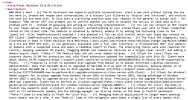
1792768653459.png
 
The Change Log page always loads pretty fast for me too, especially for how much content it has. Just like @pleskuser67553 it mostly use it with Ctrl+F to instantly search for text strings. However I do feel there is room for improvement here. Going trough the change log manually to keep track of things can be quite cumbersome.

A suggestion for adding filters to the page have been made in the past. Which I think is still an excellent idea :)
 
Hi, @WSNHosting . Thank you for your feedback. Plesk is a mature product, and the changelog contains entries covering multiple Plesk releases and updates, so its length reflects release notes over many versions documented. However, I understand that navigating a long page can be frustrating. I will consult with our team on the possibility to introduce collapsible components or some other manner for improving navigation.

I tested the page on my side, but I am not able to reproduce the loading issue you described. Could you share a few more details about what happens when you try to open it? Also, what OS and browser you are using? Thank you in advance.
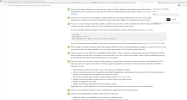
1793161911849.png
 
@WSNHosting , if I correctly interpret the screenshot the delay occurs during a translation of the page to Thai (Please correct me if I am wrong). If my assumption is right, could you please check whether the same issue occurs when you open the changelog without translating it? It would also be helpful to test the page in another browser.
 
Both issues occur: the page fails to load even in a standard view, and if I try to translate the content into Thai, it becomes completely unresponsive—forcing me to use "End Task" to close it.


I have a question: since you no longer support the older versions, why is information about them still displayed on this page? Which version should I start with instead?

Plesk Onyx 17.9 Preview 3​

2 July 2018
 
Thank you for the confirmation. Without translation enabled, the page loads immediately on Edge. I was able to replicate a slight delay when I attempted to translate it to Thai, but it eventually loaded. The same behavior is not reproducible on Chrome, so it is likely due to a performance issue with Microsoft Edge's translation functionality. As for your question about the Plesk Onyx entries, I trust that's for historical documentation.
 
Back
Top