• The APS Catalog has been deprecated and removed from all Plesk Obsidian versions.
    Applications already installed from the APS Catalog will continue working. However, Plesk will no longer provide support for APS applications.
  • Please be aware: with the Plesk Obsidian 18.0.78 release, the support for the ngx_pagespeed.so module will be deprecated and removed from the sw-nginx package.

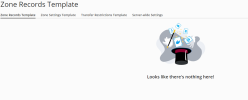
Resolved Zone Records Template is empty

Quinten

Regular Pleskian
Server operating system version
Ubuntu 22
Plesk version and microupdate number
18.0.47 Update #5
Hello,

It seems my DNS zone template is empty and i do not have any buttons to add any records.
How do i fix this?

Kind Regards,
Quinten
 

Attachments

  • Screenshot 2022-11-07 142135.png
    Screenshot 2022-11-07 142135.png
    40.3 KB · Views: 5
Are you running Plesk in Restricted Mode (perhaps unknowingly), and is the DNS template settings enable option unchecked in Tools & Settings ->Restricted Mode Settings?
 
Are you running Plesk in Restricted Mode (perhaps unknowingly), and is the DNS template settings enable option unchecked in Tools & Settings ->Restricted Mode Settings?
Thank you for your reply.
I am not running in restricted mode i am logged in on the only admin account.
I deleted some records and now the whole tab is empty even without buttons
 
If there were entries/records in the template before than this might be a bug? Not sure.

You could try to add new records via the Plesk CLI. Like for example plesk bin server_dns --add -mx "" -mailexchanger "mail.<domain>" -priority 35
 
Thank you, adding that 1 record you send gave me the controls back!
This could indeed be a bug.

So if all the records are deleted i lost all other buttons and majority of the layout
 
Back
Top