Follow along with the video below to see how to install our site as a web app on your home screen.
Note: This feature may not be available in some browsers.
The APS Catalog has been deprecated and removed from all Plesk Obsidian versions. Applications already installed from the APS Catalog will continue working. However, Plesk will no longer provide support for APS applications.
Please be aware: with the Plesk Obsidian 18.0.78 release, the support for the ngx_pagespeed.so module will be deprecated and removed from the sw-nginx package.
Maybe not speaking your language I can't explain myself well..
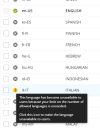
For the 15-day trial I installed and used Italian, now the license actually says that I can only use one language, but why can't I use my own that I have to be forced to use English?
A standard Plesk license allows you to use one language pack. You should be able to select whatever default language you want. Doesn't that work for you?