• The APS Catalog has been deprecated and removed from all Plesk Obsidian versions.
    Applications already installed from the APS Catalog will continue working. However, Plesk will no longer provide support for APS applications.
  • Please be aware: with the Plesk Obsidian 18.0.78 release, the support for the ngx_pagespeed.so module will be deprecated and removed from the sw-nginx package.

11.5 No longer can see file names in File Manager.

MichaelS67

New Pleskian
If I log into a customers account (or they do) we can get to file manager but there are no file names anymore. I can see the files and the permissions etc.. etc.. but there is no file name so can't tell what is what anymore.

Do I have something switched on/off somewhere?

Thanks
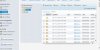
 
I think I figured out why.. Screen Resolution.. UGH!! I have bad eyesite I can't use the higher resolution. Is there a way to change the theme or something to have it how the old Plesk version was? I had no issues prior to this version of plesk

Thanks
 
Back
Top