
 Facebook
 Twitter
Hi,
Plesk version 12 running on Linux
Plesk CP and website down after upgrading PHP version.
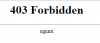
It shows 403 Forbidden nginx and cannot access Plesk panel at all.
tried these commands
#service httpd restart [FAILED]
# service httpd start [FAILED]
# plesk repair all
Usage: plesk [command]
Commands:
help - Show help and exit
version - Show product version information
db - Database related commands. Open MySQL console by default.
bin - Run the specified Plesk command-line utility (e.g., domain, client)
sbin - Run the specified Plesk internal utility
php - Run a PHP script using the proper PHP interpreter
conf - Open the specified Plesk configuration file in the editor
log - Display the specified Plesk log file
installer - Parallels Installer shortcuts and command completion.
# service apache2 start
apache2: unrecognized service
Please help. Thank you.
Plesk version 12 running on Linux
Plesk CP and website down after upgrading PHP version.
It shows 403 Forbidden nginx and cannot access Plesk panel at all.
tried these commands
#service httpd restart [FAILED]
# service httpd start [FAILED]
# plesk repair all
Usage: plesk [command]
Commands:
help - Show help and exit
version - Show product version information
db - Database related commands. Open MySQL console by default.
bin - Run the specified Plesk command-line utility (e.g., domain, client)
sbin - Run the specified Plesk internal utility
php - Run a PHP script using the proper PHP interpreter
conf - Open the specified Plesk configuration file in the editor
log - Display the specified Plesk log file
installer - Parallels Installer shortcuts and command completion.
# service apache2 start
apache2: unrecognized service
Please help. Thank you.


