
 Facebook
 Twitter
Javier Martínez Espinosa
New Pleskian
Hi guys,
A developer created a cron in plesk, to update all the categories, catalog and images of my client's online store in prestashop.
After executing it, it shows the following:
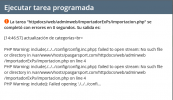
I have been bugging with open_basedir but nothing was fixed for me.
The developer tells me exactly "the original problem is the composition of the routes that your server does when it runs"
I've tried a lot of things by reading various community forums, but nothing has gotten the script working
I appreciate any comments.
A developer created a cron in plesk, to update all the categories, catalog and images of my client's online store in prestashop.
After executing it, it shows the following:
I have been bugging with open_basedir but nothing was fixed for me.
The developer tells me exactly "the original problem is the composition of the routes that your server does when it runs"
I've tried a lot of things by reading various community forums, but nothing has gotten the script working
I appreciate any comments.
