• The new Python extension is now available. It allows customers to deploy and manage WSGI-based Python applications on their websites directly from Plesk.
  • The Plesk Mobile apps for iOS and Android and the Plesk Mobile Center extension have been deprecated, and are no longer available for new installations. In Plesk Obsidian 18.0.84, the Plesk Mobile Center extension will be removed from servers during the upgrade, and the Plesk Mobile apps will lose their server management features.
  • The Social Login extension has been deprecated and will be removed in Plesk Obsidian 18.0.84. After that, it will no longer be possible to log in to Plesk with a Google, Facebook, GitHub account, or with a passkey. Plesk usernames and passwords, as well as logging in with a WebPros Account, are not affected.

Important "Active List" will be discontinued and replaced by "Dynamic List" starting March 2024

I would honestly rather pay more and keep Active List - as dynamic list is horrible to use as a developer - I feel losing this feature is massively detrimental to professionals and day-to-day working practices. You say this was a decision taken by polling people, however, after reading this thread, I see no one who actually champions the dynamic list mode. Please reconsider!!!
 
I would honestly rather pay more and keep Active List - as dynamic list is horrible to use as a developer - I feel losing this feature is massively detrimental to professionals and day-to-day working practices. You say this was a decision taken by polling people, however, after reading this thread, I see no one who actually champions the dynamic list mode. Please reconsider!!!

Can you explain why the Active List is easier to use than the Dynamic List?
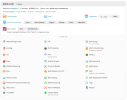
For me, it's a bunch of icons placed randomly on the screen without any logic. I always had to search for a particular icon that I needed to accomplish a task:
Active List.png

I do think that the current Dynamic List design is too crowded. Why not let us choose which icons should be displayed on the dashboard view (the first tab of the dynamic list)?
 
For me, it's a bunch of icons placed randomly on the screen without any logic. I always had to search for a particular icon that I needed to accomplish a task:
Ah, just like me you did not discover at first how to sort them alphabetically ;-) But it was possible ...

Anyway: No, the Active List ist not coming back. Tests have shown that it's only a matter of getting used to the new layout.
 
@Deleted member
To pinpoint the slow behavior of Plesk, could you please:
Add this to the panel.ini:
Code:
[domainManagement]
favicons.enabled = true
showColumnSetupDate = true ; shows the "Setup Date" column
showColumnExpirationDate = true ; shows the "Expiration Date" column
showExtensionsColumns = true ; shows the "Rank Tracker" column

Next,
Open the affected page in Firefox.
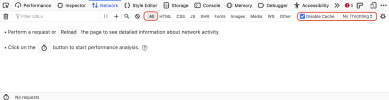
Open the browser console in Firefox, and open the Network tab.
Check the items marked in red.

Screenshot 2024-02-01 at 13.12.47.png

Next, hit the trashcan to clear any previous requests.
Hit [Reload] to start measuring the speed of the page.
And paste a screenshot of the status bar when the page is redrawn? That should tell how long it takes to build the page.
Thanks!
 
Today Plesk has announced that the "Active List" will be discontinued and replaced by "Dynamic List" starting March 2024. You already know "Dynamic List" and it is already the default on many Plesk installations.

We have prepared an interesting comparison between these two user interface views for you here:

If you are among the few who still prefer Active List, this thread is for you: After going through the above article, please let us know what you'd like to see in Dynamic List that it can become your favorite new user interface view. Simply post and discuss your ideas in this thread.
I also dont understand why the active list will be discontinued.

I also think, most Users will still use the active list, i think!
 
@Linulex, the Compatibility mode setting will appear in the Dynamic list / Hosting with the next Plesk release (18.0.59).
Since Plesk Obsidian 18.0.59, published February 20th, 2024: In Dynamic List view, added the missing “Compatibility mode for the legacy option ‘Separate SSL/TLS and non-SSL/TLS content’” option to the “Hosting” page of domains. (PPPM-14258)
 
I appreciate the detailed comparison between Dynamic List and Active List. While I've been accustomed to Active List, I'd love to see enhanced customization options and a seamless transition process in Dynamic List to make it my preferred UI view. Looking forward to the updates!
 
Where is the website "Preview" link, that appears in Active List, but I can't find in Dynamic List?
 
Hoover over the website thumb nail image.
Thank you!

Plesk: If I'm visually scanning the entire page to find an option, it should be more intuitive. I shouldn't have to hover over everything to see that it contains more choices. Even a hamburger or kebob menu (tri-colon or vertical ellipsis) would be helpful.
 
Hello. Can anyone please tell how to assign a database to a domain/subdomain in dynamic list view? In Active list view the setting was on the top right, you could create a new DB or assign an existing DB to a domain/subdomain. In dynamic list view there is only a button "Databases" and if clicked it takes you to the list of all databases on the server. It seems you can only assign a DB to a domain/subdomain when you create a new DB, but there is no way to change it later on. I've spent like 15 minutes searching for it right now.
 
@TRANSFER, the Databases button takes you to the list of the databases within one subscription, not the whole server.
For every database, there is a control near its title that lets you assign or reassign it to one of the domains within the subscription.
 

Attachments

  • Screenshot 2024-03-05 at 19.37.15.png
    Screenshot 2024-03-05 at 19.37.15.png
    25.4 KB · Views: 8
  • Screenshot 2024-03-05 at 19.37.33.png
    Screenshot 2024-03-05 at 19.37.33.png
    30.8 KB · Views: 8
Back
Top