• Debian 11 is approaching its end-of-life (vendor EOL date - August 31, 2026). Plesk Obsidian 18.0.80 will be the last release to support it.
    If you are running Plesk Obsidian on Debian 11, we recommend you upgrade those servers to Debian 12 using our dist-upgrade tool.
  • We plan to deprecate and remove the support for XML RPC protocol versions earlier than 1.6.9.1 in Plesk Obsidian 18.0.82. We strongly recommend that you update all existing integrations using earlier versions of the XML RPC protocol to comply with the version 1.6.9.1 specification.

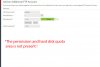
Issue Added user FTP, doesn't appear the permission area and hard disk quota

Luca.franchini

New Pleskian
Hello,
I have the following problem:
When I add an FTP user it doesn't appear
the permission area and hard disk quota,
how can I activate the write and read permissions?
Without the activation of the write and read permissions I cannot read the files in the ftp.

I attach image
tnx
 

Attachments

  • screen.jpg
    screen.jpg
    152.8 KB · Views: 8
Both features are for Windows only.

If you add an FTP user to /httpdocs/subwebsite, the permission is read and write for that path by default.


Vote here:


To be honest with you, personally I don't see any benefits on this. but I'll add my vote because Windows is not above Linux.
 
Back
Top
