Follow along with the video below to see how to install our site as a web app on your home screen.
Note: This feature may not be available in some browsers.
The APS Catalog has been deprecated and removed from all Plesk Obsidian versions. Applications already installed from the APS Catalog will continue working. However, Plesk will no longer provide support for APS applications.
Please be aware: with the Plesk Obsidian 18.0.78 release, the support for the ngx_pagespeed.so module will be deprecated and removed from the sw-nginx package.
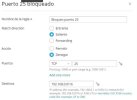
Estoy creando una regla en el firewall de plesk que bloquea el puerto 25 solo para salida, pero falta algo ya que puedo continuar enviando correo usando ese puerto, adjunto una captura de pantalla.
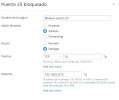
I am creating a rule in plesk firewall that blocks port 25 for outbound only, but something is missing since I can continue to send mail using that port, I am attaching a screenshot.
The rule shown in the screenshot only block outbound traffic on port 25 for the 192.168 range. Which is an private IP address range. There usually isn't a whole lot of activity on that IP range unless you have a local network running. Which makes me wonder why you want to block this IP range specifically?
I have put that range because it is the one that came in the example, what I want to block is all the outgoing traffic through port 25, what should I put in that case?
I assume you want to block port 25 so email apps (Thunderbird, Outlook, Apple mail, ect) cannot use it to send e-mail because it's an insecure connection?
However port 25 is also used by a sever for talking to other (mail) servers. So if you want send email to an Gmail email address (for example) your server cant connect to to the Gmail servers to send the email. So if you block 25 no email can be send at all.