• The APS Catalog has been deprecated and removed from all Plesk Obsidian versions.
    Applications already installed from the APS Catalog will continue working. However, Plesk will no longer provide support for APS applications.
  • Please be aware: with the Plesk Obsidian 18.0.78 release, the support for the ngx_pagespeed.so module will be deprecated and removed from the sw-nginx package.

Resolved [BUG] Plesk 18.0.77 – File Manager list view broken for psaserv-owned directories

erdrol

New Pleskian
Server OS: Ubuntu 24.04.4 LTS
Plesk version: 18.0.77 Update #1 Web Pro Edition

SYMPTOMS:
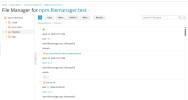
File Manager list view displays metadata (date, permissions, owner, group) in broken vertical layout for directories owned by group "psaserv".
Directories with group "psacln" display correctly.

REPRODUCE:
1. Open File Manager on any domain
2. Navigate to httpdocs (group: psaserv)
→ Layout broken: metadata stacks vertically
3. Enter any subfolder (group: psacln)
→ Layout correct: normal table columns

CAUSE: Regression introduced in 18.0.77 accessibility/WCAG refactoring.
The file list renderer appears to handle psaserv and psacln entries
through different code paths, breaking the layout for psaserv entries.

EXPECTED: Consistent layout regardless of file group ownership.
 
I am experiencing the same thing. To clarify the STR a bit further, this happens when you explicitly click the httpdocs directory (not when opening the file manager and and the httpdocs is already loaded/open).

(Also moved thread to the Reports forum.)
 
Thank you both for the report. Sorry, am I not getting something right or does the issue just not appear on my end? Just for the record, could you please confirm what browser are you using and if possible can you attach a screenshot?
Thanks in advance.
 

Attachments

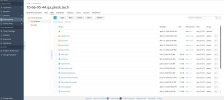
  • Screenshot of File Manager for 10-66-95-44.qa.plesk.tech - Plesk Obsidian 18.0.77.jpg
    Screenshot of File Manager for 10-66-95-44.qa.plesk.tech - Plesk Obsidian 18.0.77.jpg
    273.6 KB · Views: 3
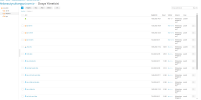
After fiddling around a bit more, I discovered this gets caused when there are files with long file name present in a directory. The directory ownership is unrelated. So the additional step would be to cerate a file with a long file name. I used proxy_authentication_required.html as file name, but suspect it also depends on your monitor/screen size. The bigger your screen, the longer the file name needs to be to trigger the issue.


Screenshot 2026-04-14 221722.png
 
Thanks, Kaspar. That was very helpful. It looks like a combination of both - the user and the file name, but most importantly the screen size. I was able to replicate it on my laptop screen with the long user + long file name. Will open an internal report and follow-up with more details.
 
The behavior was confirmed as bug identified with ID PPPM-15348. I cannot provide an ETA for the fix yet. For the time being, the workaround we can suggest is either to zoom out or to rename files/users with a lot of characters. Thank you both for bringing our attention to the issue.
 
The behavior was confirmed as bug identified with ID PPPM-15348. I cannot provide an ETA for the fix yet. For the time being, the workaround we can suggest is either to zoom out or to rename files/users with a lot of characters. Thank you both for bringing our attention to the issue.

Hi Sebahat,

Thank you for confirming the bug and providing the tracker ID (PPPM-15348).

To be completely honest, this issue has caused me an incredible amount of frustration over the past few days. Not knowing that this was an official UI regression introduced by the update, I spent days troubleshooting my own environment. I went as far as formatting and reinstalling my servers 12 times from scratch, constantly looking for a misconfiguration or a corruption on my end.

It is quite disappointing to see such a basic CSS/layout bug make it into a production release. Plesk is a world-renowned, industry-leading control panel backed by highly skilled and well-compensated engineers. A core component like the File Manager—which thousands of administrators use every single hour—should undergo much more rigorous QA and regression testing across different screen resolutions and username lengths before being deployed.

While I appreciate the temporary workaround of zooming out the browser, it is far from an ideal solution for a premium platform. I sincerely hope the development team prioritizes this and pushes a hotfix soon so that we can get the clean, functional layout back without messing with our browser scales.

Looking forward to a quick resolution.

Best regards,
 
@mahmut ozdemir , I am sorry to hear about the inconvenience caused by the bug. A fix has been released along with Plesk Obsidian 18.0.78:

Fixed an issue where File Manager would be rendered incorrectly on devices with small viewports, or when the page was zoomed in significantly. (PPPM-15348)
 
@mahmut ozdemir , I am sorry to hear about the inconvenience caused by the bug. A fix has been released along with Plesk Obsidian 18.0.78:
Hi Sebahat,

I am afraid there is a major misunderstanding or a version mix-up here.

The change log states that PPPM-15348 was fixed in 18.0.78 for small viewports/zoomed-in pages. However, the screenshots I provided are from a server that is already running Plesk Obsidian 18.0.78.

The bug was actually introduced or became much worse with this exact 18.0.78 update. In version 18.0.77, the list view was perfectly fine on our end.

Furthermore, the issue is not about "small viewports." It happens on large desktop screens because long domain names (usernames) and specific file groups (like psaserv) push the table columns, causing the text to wrap awkwardly and completely ruining the vertical alignment and padding of the rows.

Could you please double-check this with the development team? The fix deployed in 18.0.78 clearly caused a massive regression on standard desktop layouts instead of solving the problem.

Thank you.

The problem persists, and my screen is a 32-inch OLED :)

Screenshot_2101.png
 
Back
Top