• The APS Catalog has been deprecated and removed from all Plesk Obsidian versions.
    Applications already installed from the APS Catalog will continue working. However, Plesk will no longer provide support for APS applications.
  • Please be aware: with the Plesk Obsidian 18.0.78 release, the support for the ngx_pagespeed.so module will be deprecated and removed from the sw-nginx package.

Issue BUG?: SSH Terminal Extension (/modules/ssh-terminal/) unusable on latest Google Chrome on Linux

Vento

New Pleskian
Server operating system version
Ubuntu, but doesn't matter (tested on multiple)
Plesk version and microupdate number
Plesk Obsidian 18.0.77 Update #2 Web Host Edition
Plesk Obsidian 18.0.77 Update #2 Web Host Edition & Latest Google Chrome for Linux (Version 147.0.7727.137 (Official Build) (64-bit)):

When navigating to /modules/ssh-terminal/, the SSH terminal loads fine, but is displaying black text on black background --> completely unusable.

Happens since the last PLESK update, and only seems to affect Google Chrome on Linux (latest Version).
However, everything works as expected (white text on black background) when using latest Firefox on Linux or Google Chrome on Windows.

So I am unsure whether this is a PLESK issue or a Chrome issue.

Anybody else experiencing this?
Any mitigations or ideas?

Thanks in advance... Vento.
 
Hi, Vento. Could you please confirm if you have tested that in Incognito mode as well? Just want to exclude the possibility of browser extensions interfering.
 
Dear Sebahat

Yes the same issue
- With all extensions turned off
- In Incognito Mode

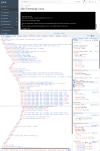
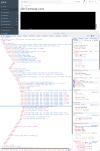
BUT I found out it seems to be a font issue. See screenshots attached. The CSS for the terminal refers to
font-family: courier-new, courier, monospace;
I am on Ubuntu 26.04 and do have ms-corefonts installed which should provide Courier and Courier New, and Courier and Courier New are available (at least in the Font Manager and LibreOffice...). However Chrome does not seem to pick up and render the font. When I change the CSS to:
font-family: monospace;
everything works fine. Also, with the original CSS on Ubuntu 25 (or older) with ms-corefonts, everything works fine.

So it seems to be an Issue in the triangle of "Ubuntu26 - Chrome - Courier", not PLESK.

However I have not found a workaround yet... Apart from manually changing the CSS in DevTools every time I visit the terminal page... or using Firefox... which sucks. Tried purging&reinstalling the Courier fonts, rebuilding font cache, etc... Without luck.

Suggestion: Make the default CSS for the terminal just
font-family: monospace;
if thats a possibility.
 

Attachments

  • Screenshot_260507_133551.png
    Screenshot_260507_133551.png
    505.4 KB · Views: 4
  • Screenshot_260507_133525.png
    Screenshot_260507_133525.png
    481.6 KB · Views: 4
UPDATE: I did find a workaround on Ubuntu 26.04:

sudo apt install ttf-mscorefonts-installer -y # if not already installed
mkdir -p ~/.config/fontconfig/
nano ~/.config/fontconfig/fonts.conf
Then put this in the ~/.config/fontconfig/fonts.conf file:
<?xml version="1.0"?>
<!DOCTYPE fontconfig SYSTEM "fonts.dtd">
<fontconfig>
<match target="pattern">
<test name="family" qual="any">
<string>Courier</string>
</test>
<edit name="family" mode="assign" binding="same">
<string>Courier New</string>
</edit>
</match>
</fontconfig>
Then rebuild font cache & restart Chrome:
fc-cache -f -v
pkill chrome
fc-match "Courier"
fc-match should now output something like:
Courier_New.ttf: "Courier New" "Regular"
which maps any requests for the broken "Courier" font to "Courier New".
This is respected by Google Chrome and the PLESK Terminal works as usual again.

So: Case Closed, NOT a PLESK Problem at all. But still maybe helpful for people on Ubuntu 26.04. :)

PS: Where would I even report this to the Ubuntu people?!??
 
Back
Top