Facebook
 Twitter
The current GUI for email account size has a little "bar" graphic which, is frankly useless. Pale grey on white background is almost invisible. This graphic actually looks
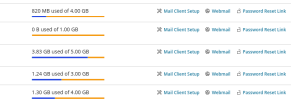
See example here:
And with mouse hover over the mailbox:

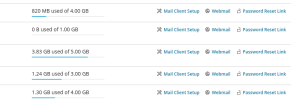
Here you can see four genuine accounts of varying sizes and it's extremely hard to gauge quickly and easily how much of each mailbox is actually full. The pale grey "empty mailbox" GUI is vague and bland.
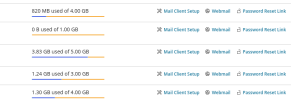
Below, is a quick retrofix (in Krita) showing clear distinguishing colours for both the full/empty aspects, in the white standard Plesk Obsidian colour scheme.
And with mouse hover over the mailbox:

I can't find and am unaware if there is any Extension or other ability to change Plesk colours / theme / for the Obsidian Admins (I have looked).
So, please can colour GUI for mailbox sizes actually be made to be visually distinct from the background. It would also be really good if the coloured bar is actually more than 2 pixels wide - you've got space to play with, make it 5 pixels wide, for instance:

This change can be done in a matter of minutes and would make the email GUI interface on the Obsidian Plesk Admin sooo much more usable .
I don't care which colours are actually used as long as they are a) distinct and clear from each other, and b) distinct and clear from the background. The colours I use here are for example only.
Cheers
See example here:
And with mouse hover over the mailbox:
Here you can see four genuine accounts of varying sizes and it's extremely hard to gauge quickly and easily how much of each mailbox is actually full. The pale grey "empty mailbox" GUI is vague and bland.
Below, is a quick retrofix (in Krita) showing clear distinguishing colours for both the full/empty aspects, in the white standard Plesk Obsidian colour scheme.
And with mouse hover over the mailbox:
I can't find and am unaware if there is any Extension or other ability to change Plesk colours / theme / for the Obsidian Admins (I have looked).
So, please can colour GUI for mailbox sizes actually be made to be visually distinct from the background. It would also be really good if the coloured bar is actually more than 2 pixels wide - you've got space to play with, make it 5 pixels wide, for instance:
This change can be done in a matter of minutes and would make the email GUI interface on the Obsidian Plesk Admin sooo much more usable .
I don't care which colours are actually used as long as they are a) distinct and clear from each other, and b) distinct and clear from the background. The colours I use here are for example only.
Cheers