• Debian 11 is approaching its end-of-life (vendor EOL date - August 31, 2026). Plesk Obsidian 18.0.80 will be the last release to support it.
    If you are running Plesk Obsidian on Debian 11, we recommend you upgrade those servers to Debian 12 using our dist-upgrade tool.
  • We plan to deprecate and remove the support for XML RPC protocol versions earlier than 1.6.9.1 in Plesk Obsidian 18.0.82. We strongly recommend that you update all existing integrations using earlier versions of the XML RPC protocol to comply with the version 1.6.9.1 specification.

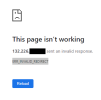
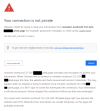
Resolved Cannot access to Plesk panel page

miphan

New Pleskian
Server operating system version
Ubuntu 22.04
Plesk version and microupdate number
Plesk Obsidian 18.0.50

Attachments

  • 2023-05-02_18-04-06.png
    2023-05-02_18-04-06.png
    9.6 KB · Views: 21
  • plesk_err.png
    plesk_err.png
    53.5 KB · Views: 15
Chrome probably won't let you login, because the SSL/TLS certificate data are wrong. Please try to use another browser and accept the SSL/TLS "exception" so that the browser connects using a wrong certificate.
 
Chrome probably won't let you login, because the SSL/TLS certificate data are wrong. Please try to use another browser and accept the SSL/TLS "exception" so that the browser connects using a wrong certificate.
I've tried but no luck. I'm not sure if this issue is related to the DNS configs.
 
Since you got in using 8880, I would take a look now at getting a proper hostname setup based on one of your domains and issuing an actual SSL for it so that you can go back to the https port. Glad you got in!
 
Since you got in using 8880, I would take a look now at getting a proper hostname setup based on one of your domains and issuing an actual SSL for it so that you can go back to the https port. Glad you got in!
Thank you, Mark. All my issues have been fixed now. Much appreciated :D
 
Back
Top