• Halloween is coming! To celebrate the occasion, we dusted off a couple of old skins, and even created a brand new one (Pixel).
    To get into the festive spirit, install the Skins extension.
  • The new Python extension is now available. It allows customers to deploy and manage WSGI-based Python applications on their websites directly from Plesk.
  • The Plesk Mobile apps for iOS and Android and the Plesk Mobile Center extension have been deprecated, and are no longer available for new installations. In Plesk Obsidian 18.0.84, the Plesk Mobile Center extension will be removed from servers during the upgrade, and the Plesk Mobile apps will lose their server management features.
  • The Social Login extension has been deprecated and will be removed in Plesk Obsidian 18.0.84. After that, it will no longer be possible to log in to Plesk with a Google, Facebook, GitHub account, or with a passkey. Plesk usernames and passwords, as well as logging in with a WebPros Account, are not affected.

can't disable services in plesk 10.4.4

ronv

Basic Pleskian
Hi,

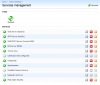
What is the way to disable services in Plesk 10.4.4 on an Ubuntu Linux server? While the documentation (Administrator's Guide, section 'System Time and Services') says the 'Services Management' section of the Plesk interface should contain a 'disable' button, I only see 'start', 'stop', and 'restart' buttons for each service (see screenshot attached).

I want to disable the Tomcat service, but just stopping it doesn't work: after a couple of seconds, all Plesk-controlled Tomcat processes start again. Having no control over this is rather annoying; how do I properly disable services in Plesk? If impossible via the Plesk web interface, is there perhaps a way to achieve this via console commands?

Ron
 

Attachments

  • pleskservices.png
    pleskservices.png
    51.3 KB · Views: 10
Try to use

# /usr/local/psa/admin/bin/tomcatmng --stop
 
Thanks for the suggestion, but this has the same effect as:
-killing tomcat manually (via 'kill')
-stopping the service from the Plesk interface ('services management')

All (3) Tomcat processes do stop, but restart within the minute.

Ron
 
Ok, can you advice on what to do, please? I didn't have this issue in the past, has this changed recently?
 
Look at Tomcat section of watchdog config file /usr/local/psa/etc/modules/watchdog/monitrc

# Tomcat
check process tomcat with pidfile "/var/run/tomcat5.pid"
start = "/usr/local/psa/admin/bin/tomcatmng --start"
stop = "/usr/local/psa/admin/bin/tomcatmng --stop"
if failed port 9080 with timeout 5 seconds then restart
if 5 restarts within 5 cycles then timeout
every 1 cycles
mode manual

and try to comment it. Restart watchdog after that.
 
Thanks for the suggestion. Unfortunately, this doesn't help: Tomcat is restarted.

Did I forget anything?
-I've commented out the "Tomcat" section in /usr/local/psa/etc/modules/watchdog/monitrc
-I've stopped watchdog with /usr/local/psa/admin/sbin/modules/watchdog/wdservice monit stop /usr/local/psa/etc/modules/watchdog/monitrc (which returned: 'stop: Job not changed: psa-monit')
-I've restarted watchdog with /usr/local/psa/admin/sbin/modules/watchdog/wdservice monit start /usr/local/psa/etc/modules/watchdog/monitrc, which returned:

psa-monit (start) waiting
psa-monit (start) starting
psa-monit (start) pre-start
psa-monit (start) spawned, process 14827
psa-monit (start) post-start, (main) process 14827
psa-monit (start) running, process 14827
 
Sorry, after all, your solution does seem to work: commenting out the tomcat section in the config file and restarting the watchdog keeps Tomcat away. Now let's hope that config file won't be overwritten by Plesk at some time.

Do you (as member of the Parallels Team) know this is a bug, feature, or documentation glitch (see my original post)? Is there a place to properly report such issues instead of this forum?
 
Back
Top