Follow along with the video below to see how to install our site as a web app on your home screen.
Note: This feature may not be available in some browsers.
The APS Catalog has been deprecated and removed from all Plesk Obsidian versions. Applications already installed from the APS Catalog will continue working. However, Plesk will no longer provide support for APS applications.
Please be aware: with the Plesk Obsidian 18.0.78 release, the support for the ngx_pagespeed.so module will be deprecated and removed from the sw-nginx package.
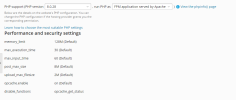
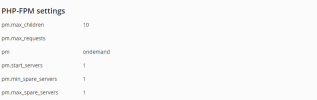
i have an admin account access but i cant add additionnal settings , and i can't edit max-children for fpm ! access denied how i can solve the problem please !
Is your account name "admin" or is it an account that someone told you has admin privileges? Only if you are logged in as "admin" these settings are available. The user name is important.
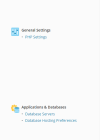
my problem is that in plesk , under General informations i can only find php settings , all the other options not found ! and i have admin account and i need to change max-child because my website always showing error 504 and in logs this issue always appear
Looks like you might be doing this under the Customer's Portal with a subscription that does not allow you to change the PHP settings. Ether that or you have restricted mode enabled. I would suggest checking restricted mode settings to make sure that's off which is under Tools & Settings > Restricted Mode Settings, and making sure "Enable Restricted Mode" is unchecked