• Debian 11 is approaching its end-of-life (vendor EOL date - August 31, 2026). Plesk Obsidian 18.0.80 will be the last release to support it.
    If you are running Plesk Obsidian on Debian 11, we recommend you upgrade those servers to Debian 12 using our dist-upgrade tool.
  • We plan to deprecate and remove the support for XML RPC protocol versions earlier than 1.6.9.1 in Plesk Obsidian 18.0.82. We strongly recommend that you update all existing integrations using earlier versions of the XML RPC protocol to comply with the version 1.6.9.1 specification.

Resolved can't edit php-fpm server reached max_children setting

devit

New Pleskian
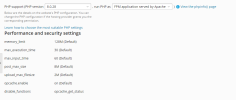
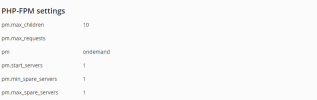
i have an admin account access but i cant add additionnal settings , and i can't edit max-children for fpm ! access denied how i can solve the problem please !
 
Is your account name "admin" or is it an account that someone told you has admin privileges? Only if you are logged in as "admin" these settings are available. The user name is important.

Where do you see "access denied"?
 
yes i have an admin account ! the login and password from the plesk when i installed the server : root and password
 
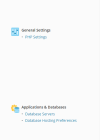
my problem is that in plesk , under General informations i can only find php settings , all the other options not found ! and i have admin account and i need to change max-child because my website always showing error 504 and in logs this issue always appear
 

Attachments

  • 1.PNG
    1.PNG
    32.5 KB · Views: 8
  • 2.PNG
    2.PNG
    10.1 KB · Views: 8
  • 3.PNG
    3.PNG
    11.6 KB · Views: 9
Looks like you might be doing this under the Customer's Portal with a subscription that does not allow you to change the PHP settings. Ether that or you have restricted mode enabled. I would suggest checking restricted mode settings to make sure that's off which is under Tools & Settings > Restricted Mode Settings, and making sure "Enable Restricted Mode" is unchecked
 
Looks like you might be doing this under the Customer's Portal with a subscription that does not allow you to change the PHP settings. Ether that or you have restricted mode enabled. I would suggest checking restricted mode settings to make sure that's off which is under Tools & Settings > Restricted Mode Settings, and making sure "Enable Restricted Mode" is unchecked
yes it was enabled ! thankyou !!
 
Back
Top