• Debian 11 is approaching its end-of-life (vendor EOL date - August 31, 2026). Plesk Obsidian 18.0.80 will be the last release to support it.
    If you are running Plesk Obsidian on Debian 11, we recommend you upgrade those servers to Debian 12 using our dist-upgrade tool.
  • We plan to deprecate and remove the support for XML RPC protocol versions earlier than 1.6.9.1 in Plesk Obsidian 18.0.82. We strongly recommend that you update all existing integrations using earlier versions of the XML RPC protocol to comply with the version 1.6.9.1 specification.

Resolved Can´t set up Proxy Rule for Docker Containers (Internal Error)

hansitheking

Basic Pleskian
I have installed a OnlyOffice Docker Container. It is up and running, and If I open the mapped port in the firewall I can access the container via the web. Now I like to set up a Proxy Rule fore one of my Domains to have SSL-Support and access via a Domain. I have enabled manual port mapping for the container. Once I try to set up the Proxy the following message appears:
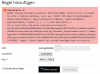
Code:
Internal error ;-P
ERROR: Zend_Db_Statement_Exception: SQLSTATE[HY000]: General error: 8 attempt to write a readonly database, query was: INSERT INTO &quot;ProxyRules&quot; (&quot;domainId&quot;, &quot;configurationId&quot;, &quot;path&quot;, &quot;port&quot;) VALUES (?, ?, ?, ?) (Pdo.php:235)<br />
<br><a href='https://kb.plesk.com/plesk-error/search?metaId=b6bc422620304b60865ed2e1c91f6f4d&messageId=95673f8f2fc23c2ddbfce1e97ee1de0f&file=Pdo.php&line=235&type=Zend_Db_Statement_Exception&version=17.5.3&message=SQLSTATE%5BHY%5D%3A+General+error%3A++attempt+to+write+a+readonly+database%2C+query+was%3A+INSERT+INTO++%28%2C+%2C+%2C+%29+VALUES+%28%3F%2C+%3F%2C+%3F%2C+%3F%29' target='_blank'>Search for related Knowledge Base articles</a>

error-msg.png

I am running Plesk 17.5.3 with MU 21 on Ubuntu 16.04.3
 
Please make sure that you have the same permissions here:

# ll /usr/local/psa/var/modules/docker/db.sqlite3
-rw------- 1 psaadm psaadm 6144 Sep 18 11:42 /usr/local/psa/var/modules/docker/db.sqlite3
 
@IgorG Thank you for your advice! It helped me to so solve the Issue. The DB was owned by root therefore I changed it to
Code:
chown psaadm:psaadm /usr/local/psa/var/modules/docker/db.sqlite3

now the Proxy rules can be setup without any error. But the Docker container can´t be accessed (default Plesk Page ist showing up). There are no entries in the Apache error log. Is the proxy a Apache proxy or does nginx have to be up and running for this feature?

UPDATE:
I switched on Nginx and know it is working!
 
Last edited:
Back
Top