• Inviting everyone who uses WordPress management tools in Plesk
    The Plesk team is conducting a 60-minute research session that includes an interview and a moderated usability test.
    To participate, please use this link .
    Your experience will help shape product decisions and ensure the tools better support real-world use cases.

Question Clarification on Services Listed Under Restart Service in Plesk

Thomas Oryon

Regular Pleskian
Server operating system version
Redhat 9
Plesk version and microupdate number
18.0.76
Hello Plesk Support Team,

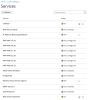
We would like to clarify why only certain Plesk-related services are shown under Tools & Settings > Services in the Plesk panel.

At the moment, we can see mainly Plesk-managed services listed there. However, services and extensions installed on the server such as Imunify360, LiteSpeed, and Site.pro are not shown in this section.

Could you please confirm:
  1. Why are only Plesk services displayed in this page?
  2. Is it expected that third-party services such as Imunify360, LiteSpeed, and Site.pro do not appear there?
  3. Is there any way to make these installed services visible and manageable from the same Services page in Plesk?
We would appreciate your clarification on whether this is a product limitation or if there is any supported method to include such services in the service management list.

Awaiting your reply.
 

Attachments

  • services.png
    services.png
    54.2 KB · Views: 2
Hello!

Under the hood, the list of services is populated by the command "plesk bin service --list". This command returns only system-level services that Plesk recognizes and manages using the OS service manager (systemd/init.d), e.g.:
  • nginx - Core web server service managed by systemd
  • fail2ban - System security service with its own daemon
  • Apache - Alternative web server
  • Postfix/Dovecot - Mail services
These are all standalone system services that:
  1. Have systemd units or init.d scripts
  2. Run as independent daemons
  3. Are registered with the OS service manager
Extension-related services typically don't appear because:
  1. Extensions run within existing services - they're not separate system services but rather:
    • PHP modules/libraries
    • Apache/nginx modules
    • Plesk panel components
  2. They don't have independent daemons - extensions like:
    • WordPress Toolkit
    • Let's Encrypt
    • Site Import
    • Most Plesk extensions
    • These run within the Plesk panel process or as on-demand scripts, not as standalone services.
  3. Not registered with systemd/init.d - The plesk bin service command only lists services that are:
    • Registered in /etc/systemd/system/ or /etc/init.d/
    • Known to Plesk's service management infrastructure
For Imunify360 (imunify360.service) and Litespeed (lsws), they should be present in the list but you may need to click "refresh" to reread the list. Site.pro does not have a separate service/deamon - it's basically a PHP code that runs within a webserver (LiteSpeed in your case).

So basically, the list depends on how exactly a certain component/extension was developed in the first place and, obviously, there is no way to add it to the services list if there is no service at all.
 
Back
Top