• Debian 11 is approaching its end-of-life (vendor EOL date - August 31, 2026). Plesk Obsidian 18.0.80 will be the last release to support it.
    If you are running Plesk Obsidian on Debian 11, we recommend you upgrade those servers to Debian 12 using our dist-upgrade tool.
  • We plan to deprecate and remove the support for XML RPC protocol versions earlier than 1.6.9.1 in Plesk Obsidian 18.0.82. We strongly recommend that you update all existing integrations using earlier versions of the XML RPC protocol to comply with the version 1.6.9.1 specification.

Issue Configurations Troubleshooter Extension not Installed

reka000

New Pleskian
Server operating system version
Ubuntu 24.04.2 LTS
Plesk version and microupdate number
Plesk Obsidian 18.0.71
I updated Plesk to version 18.0.71 and everything worked fine.

However, I discovered that one of the Plesk extensions, the Configurations Troubleshooter, suddenly wasn't installed.

This extension was installed and running normally on version 18.0.70 Update 2.

I tried to reinstall it, but the message "You already have the latest version of the product(s) and all the selected components installed. Installation will not continue" appeared.

 

Attachments

  • 2025-07-12_020853.jpg
    2025-07-12_020853.jpg
    27.5 KB · Views: 6
Hello, @reka000 . Could you please test if you are able to install the Configuration Troubleshooter:

plesk installer --select-release-current --install-component config-troubleshooter

I would also recommend reviewing the /var/log/plesk/installer/autoinstaller3.log for any errors/warnings.
 
Hello, @sebahat-hadzhi

I tried installing the Configuration Troubleshooter again with

plesk installer --select-release-current --install-component config-troubleshooter

Still failed

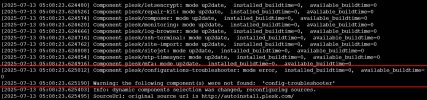
Here's the error I got from autoinstaller3
 

Attachments

  • 2025-07-13_054112.jpg
    2025-07-13_054112.jpg
    142.1 KB · Views: 7
  • 2025-07-13_054444.jpg
    2025-07-13_054444.jpg
    64.7 KB · Views: 7
Thank you. Unfortunately, I cannot identify the reason for the issue. I would suggest opening a ticket with Plesk support for further investigation on your server. To sign-in and open a ticket please go to:


If you got your license from a reseller, your reseller is in charge of providing you with support. You can raise the inquiry with them and they can forward it to our team for further processing.

If the reseller does not provide support, here is an alternative to get support directly from Plesk:

 
Back
Top