Follow along with the video below to see how to install our site as a web app on your home screen.
Note: This feature may not be available in some browsers.
The APS Catalog has been deprecated and removed from all Plesk Obsidian versions. Applications already installed from the APS Catalog will continue working. However, Plesk will no longer provide support for APS applications.
Please be aware: with the Plesk Obsidian 18.0.78 release, the support for the ngx_pagespeed.so module will be deprecated and removed from the sw-nginx package.
We discussed it here and think it is necessary to check directly on your server. It's most likely not a Plesk issue in the first place, but we're still willing to assist to the best of our knowledge. Please open a support ticket so that a Plesk engineer can check and solve the issue directly on your server.
I am struggling from the same issue it constantly flooding my logs since I clean installed my plesk panel.
These 2 following me every couple minutes.
2025-03-23 18:20:12
err
named [766]
System daemons [3]
failed to generate session key for dynamic DNS: permission denied
2025-03-23 18:20:12
err
named [766]
System daemons [3]
could not create //run/named/session.key
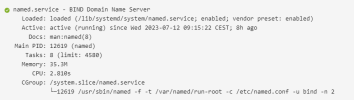
If you check the folder the folder owned by root:bind
ls -ld /run/named
drwxrwxr-x 2 root bind 40 Mar 24 11:37 /run/named
if I chown it with bind:bind, problem disappears until reboot, when the folder reverts to root:bind, how can this behaviour be adjusted is there any solution to this problem?