
 Facebook
 Twitter
- Server operating system version
- Alma Linux 9.7
- Plesk version and microupdate number
- 18.0.76
There is a cron PHP script that is intended to run and write results to an error log file.
The script appears to run but it never outputs to any error log file.
The script also does not appear to run from within Plesk as Administrator on either of the "Run Now" buttons.
How can these things be resolved?
ONE:
Example CRON code: This script appears to run but fails but does not output errors passed back from within the class to the exception, the error_log doesn't write to file. Why not?
TWO
PHP is PHP 8.3 FPM (default for this Plesk I think) . Website runs fine but the Cronjob does not.
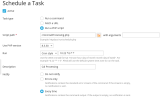
The folder "cronz" is /var/www/vhosts/server.co.uk/cronz/
The folder "error" is at /var/www/vhosts/server.co.uk/error/ and works correctly for the website log files.
The error_log system works correctly on the website but doesn't appear to work for the Cronjob .
THREE
Running the cronjob through the Plesk Admin GUI gives no reply, no result, no response. Why not? This is recent since update to 18.0.75 .
Please advise or point me to clear and explicit documentation for Plesk Obsidian.
Thanks.
The script appears to run but it never outputs to any error log file.
The script also does not appear to run from within Plesk as Administrator on either of the "Run Now" buttons.
How can these things be resolved?
ONE:
Example CRON code: This script appears to run but fails but does not output errors passed back from within the class to the exception, the error_log doesn't write to file. Why not?
Code:
ignore_user_abort(true);
$sdr = "/var/www/vhosts/server.co.uk/public_html";
$errorLog = "/var/www/vhosts/server.co.uk/error/cron_reports.txt";
require "class.database.php";

try {
    $dataBase = new Dbase($sdr.'/includes/classes/connection.dbxlink.php', true);
} catch (Exception $ex) {
    error_log("Exception caught on initialization of class on " . __FILE__ . " on line " . __LINE__ . " :: " . $ex->getMessage(), 3, $errorLog);
    exit;
}
TWO
PHP is PHP 8.3 FPM (default for this Plesk I think) . Website runs fine but the Cronjob does not.
The folder "cronz" is /var/www/vhosts/server.co.uk/cronz/
The folder "error" is at /var/www/vhosts/server.co.uk/error/ and works correctly for the website log files.
The error_log system works correctly on the website but doesn't appear to work for the Cronjob .
THREE
Running the cronjob through the Plesk Admin GUI gives no reply, no result, no response. Why not? This is recent since update to 18.0.75 .
Please advise or point me to clear and explicit documentation for Plesk Obsidian.
Thanks.
