• Debian 11 is approaching its end-of-life (vendor EOL date - August 31, 2026). Plesk Obsidian 18.0.80 will be the last release to support it.
    If you are running Plesk Obsidian on Debian 11, we recommend you upgrade those servers to Debian 12 using our dist-upgrade tool.
  • We plan to deprecate and remove the support for XML RPC protocol versions earlier than 1.6.9.1 in Plesk Obsidian 18.0.82. We strongly recommend that you update all existing integrations using earlier versions of the XML RPC protocol to comply with the version 1.6.9.1 specification.

Cron Job

igordr

New Pleskian
Helllo.

I am trying to set cron job in my plesk 11 panel to clean all folder content (files) on every 30 minutes. I set data period in shchedule task but i don't know what to enter in command line. May you help me ?

Thanks.
 
Hello,

Thanks for reply Igor. :)
Path is also problem. I don't know begin folder on plesk, earlier i have used Cpanel... Maybe vhosts/httpdocs/domain.tld/ or ?

Thanks.
 
Sorry for double post.
Nothing happens with content of folder i have entered... I don't get emails when cron is triggered, but i managed settings...
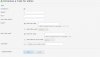
I have attached my schedule task details, may somebody help me ?

Thanks.
 

Attachments

  • aa.jpg
    aa.jpg
    69.8 KB · Views: 31
May you please write me how looks like full path of some folder by default on Plesk 11 ?

I also don't get details of triggered cron job by email, but i enabled it in settings...

Thanks.
 
Last edited:
Hi,

I am customer with licensed Plesk panel, so i deserve help. My cronjob schedule task doesn't work, nether sends email about it... Where i can post ticket about ?

Thanks
 
Home > Tools & Settings > root > Add New task >

Command: rm -f /var/www/vhosts/mydomain.com/httpdocs/*

This command will delete all content for mydomain.com domain
 
Hello,

This command doesn't work for me...

rm -f /var/www/vhosts/mydomain.com/httpdocs/*

How can i check if schedule task option works at all ?
I don't get email when it's triggered, there is no any effect.

Thanks,
Igor
 
Check that you have scheduled tasks in cron:

crontab -l


Check /var/log/cron logfile. Be sure that task runs every day.
 
cron job setting

Hi,
I read this topic and i have the same problem.
i have a VPS with plesk 11.0.9 and centos 6. I want to set a schedules task that clear a directory content every hour.
I set task in plesk cp whit "root" user and every things is fine.

0 */1 * ** rm -rf /var/lib/php/session/*

but nothing happens!

in ssh, the above command works fine but in cronjob nothing!
i run the "crontab -l" command and see the cronjob task that set in plesk cp:

# crontab -l
MAILTO=info@....
0 */1 * ** rm -rf /var/lib/php/session/*

in cron log i just see:
date ... user crontab[#####] : root
  • root

    How can i make the schedules task works?

    Regards
 
Try to point the full path to rm:
0 */1 * ** /bin/rm -rf /var/lib/php/session/*

Check also cron logs:
[root]# grep hourly /var/log/cron | tail
 
Back
Top