Follow along with the video below to see how to install our site as a web app on your home screen.
Note: This feature may not be available in some browsers.
The APS Catalog has been deprecated and removed from all Plesk Obsidian versions. Applications already installed from the APS Catalog will continue working. However, Plesk will no longer provide support for APS applications.
Please be aware: with the Plesk Obsidian 18.0.78 release, the support for the ngx_pagespeed.so module will be deprecated and removed from the sw-nginx package.
Same issue here right after an upgrade from CentOS7 to AlmaLinux 8.9, also upgraded was MariaDB using the Plesk upgrader. Uninstalled monitor extension and reinstalled, rebooted server. Error being returned is "Dashboard not found".
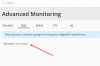
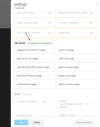
There is a known bug (EXTPLESK-5497) when are you using the build-in monitoring and disable the monitoring for a particular Disk (for eaxmple /boot/efi) via Settings > Thresholds, the Disk dashboard shows "Dashboard Not Found". In most cases this can be solved by enabling monitoring for each disk (Settings > Thresholds). Otherwise re-installing both the Monitor and Grafana extension should solve this too.