
 Facebook
 Twitter
Hi,
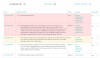
we recently installed the Datagrid VCTR extension on Plesk Onyx (latest Version). The system scan found 78 vulnerabilities with fixes available, which lead us to purchase a subscription for the Pro version in hopes of getting the most critical patched.
Trying to fix any of the vulnerabilites does however fail with the message (I also tried to fix all vulnerabilites, same result):
„There are no updates available for the selected packages from the repositories configured and enabled on this system.“
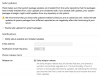
I did disable the safe repository check in the extension settings, disabled the „Enable safe updates for system packages „ option in Plesk -> System Updates and chose the Early adopter release tier. This unfortunately did not yield any results.
With the current status we can’t use any of the features of the Pro version.
Any ideas? Screenshots attached. Thanks


we recently installed the Datagrid VCTR extension on Plesk Onyx (latest Version). The system scan found 78 vulnerabilities with fixes available, which lead us to purchase a subscription for the Pro version in hopes of getting the most critical patched.
Trying to fix any of the vulnerabilites does however fail with the message (I also tried to fix all vulnerabilites, same result):
„There are no updates available for the selected packages from the repositories configured and enabled on this system.“
I did disable the safe repository check in the extension settings, disabled the „Enable safe updates for system packages „ option in Plesk -> System Updates and chose the Early adopter release tier. This unfortunately did not yield any results.
With the current status we can’t use any of the features of the Pro version.
Any ideas? Screenshots attached. Thanks

