Follow along with the video below to see how to install our site as a web app on your home screen.
Note: This feature may not be available in some browsers.
Debian 11 is approaching its end-of-life (vendor EOL date - August 31, 2026). Plesk Obsidian 18.0.80 will be the last release to support it.
If you are running Plesk Obsidian on Debian 11, we recommend you upgrade those servers to Debian 12 using our dist-upgrade tool.
We plan to deprecate and remove the support for XML RPC protocol versions earlier than 1.6.9.1 in Plesk Obsidian 18.0.82. We strongly recommend that you update all existing integrations using earlier versions of the XML RPC protocol to comply with the version 1.6.9.1 specification.
Plesk just made a backup, if I check in the settings, it's not active, however it starts every night, I also checked in the scheduled tasks but didn't find anything.
Solution..?
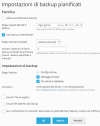
Backups can be configured in the "admin" account (Tools & Settings > Backups) or in one or more subscriptions (Account > Backup Websites). Have you checked all these backup configurations?
They both redirect to the same page....... smb/backup/list/domainId/1
It looks like it's disabled now anyway, but I don't think it's correct to enable it automatically.
Many people have space issues.