Follow along with the video below to see how to install our site as a web app on your home screen.
Note: This feature may not be available in some browsers.
We value your experience with Plesk during 2025 Plesk strives to perform even better in 2026. To help us improve further, please answer a few questions about your experience with Plesk Obsidian 2025. Please take this short survey: https://survey.webpros.com/
Plesk just made a backup, if I check in the settings, it's not active, however it starts every night, I also checked in the scheduled tasks but didn't find anything.
Solution..?
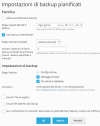
Backups can be configured in the "admin" account (Tools & Settings > Backups) or in one or more subscriptions (Account > Backup Websites). Have you checked all these backup configurations?
They both redirect to the same page....... smb/backup/list/domainId/1
It looks like it's disabled now anyway, but I don't think it's correct to enable it automatically.
Many people have space issues.