
 Facebook
 Twitter
Thomas Oryon
Regular Pleskian
- Server operating system version
- Windows server 2022
- Plesk version and microupdate number
- Plesk Obsidian Web Host Edition Version 18.0.71 Update #2
Hello,
I have tried to disable/remove the DNS from the plesk using the Update option but the message shows that Cannot be removed as attached screenshot.
Is there any other way to disable the DNS entirely instead of hosting plans settings?
Awaiting your reply.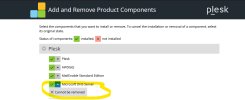
I have tried to disable/remove the DNS from the plesk using the Update option but the message shows that Cannot be removed as attached screenshot.
Is there any other way to disable the DNS entirely instead of hosting plans settings?
Awaiting your reply.


