Follow along with the video below to see how to install our site as a web app on your home screen.
Note: This feature may not be available in some browsers.
The APS Catalog has been deprecated and removed from all Plesk Obsidian versions. Applications already installed from the APS Catalog will continue working. However, Plesk will no longer provide support for APS applications.
Please be aware: with the Plesk Obsidian 18.0.78 release, the support for the ngx_pagespeed.so module will be deprecated and removed from the sw-nginx package.
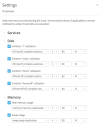
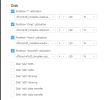
When you click the settings button in Monitoring and select the Thresholds option you'll find all the available monitoring graphs. Including IOPS, listed under the Disk header.
I am not completely sure. On my test server historic data was saved (ie not deleted) and still accessible after re-installation of the extensions. But can't grantee anything.
I have tried to remove and reinstall the Monitoring extension a couple of times (the historic data is kept) but I don't get the disk IOPS graphs. Is there a way to add them manually?