• We value your experience with Plesk during 2025
    Plesk strives to perform even better in 2026. To help us improve further, please answer a few questions about your experience with Plesk Obsidian 2025.
    Please take this short survey:

    https://survey.webpros.com/

Question Disk IOPS and data graphs missing

Crim

New Pleskian
Server operating system version
Ubuntu 22.04.4 LTS
Plesk version and microupdate number
Plesk Obsidian 18.0.59 Update #2
On one of my servers the disk IOPS and data graphs are missing, how can I add these? Is there some kind of configuration file which I can compare?

Server 1 (without IOPS and data graphs, only utilization):
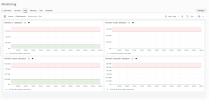
Schermafbeelding 2024-04-29 040011.png

Server 2 (with IOPS and data graphs)
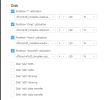
Schermafbeelding 2024-04-29 040048.png
 
When you click the settings button in Monitoring and select the Thresholds option you'll find all the available monitoring graphs. Including IOPS, listed under the Disk header.
 
I don't see IOPS on this server:

1714405603278.png

On my second server I do see IOPS:

1714405654545.png

Both are running Ubuntu 22.04.4 LTS / Plesk Obsidian 18.0.59 Update #2 with the same software RAID1 setup.
 
Hmm, I am not sure why that is. You could try to re-install the monitoring and Grafana extensions to see IOPS pops up as a option after ...
 
I am not completely sure. On my test server historic data was saved (ie not deleted) and still accessible after re-installation of the extensions. But can't grantee anything.
 
I have tried to remove and reinstall the Monitoring extension a couple of times (the historic data is kept) but I don't get the disk IOPS graphs. Is there a way to add them manually?
 
Back
Top