• The APS Catalog has been deprecated and removed from all Plesk Obsidian versions.
    Applications already installed from the APS Catalog will continue working. However, Plesk will no longer provide support for APS applications.
  • Please be aware: with the Plesk Obsidian 18.0.78 release, the support for the ngx_pagespeed.so module will be deprecated and removed from the sw-nginx package.

Resolved DKIM error

papahausa

Basic Pleskian
Server operating system version
Almalinux 8.9
Plesk version and microupdate number
18.0.57
How fix this error?
this error shows when i wanna activate it in domain.

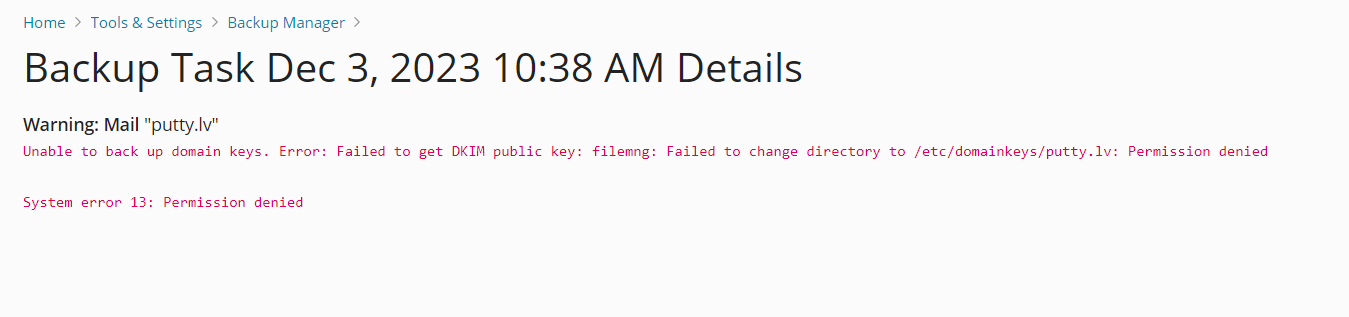
Error: Failed to get DKIM public key: filemng: Failed to change directory to /etc/domainkeys/your-services.online: Permission denied
System error 13: Permission denied
 
Have you installed the latest Plesk microupdate for 18.0.57? The number is missing from your initial post.
 
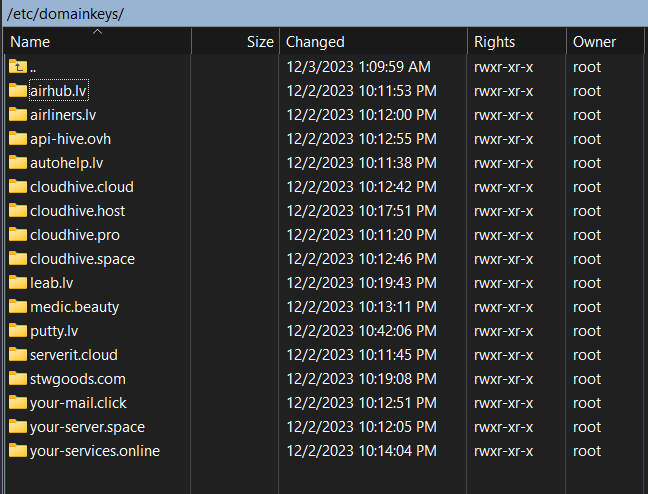
Could you please verify that the /etc/domainkeys/<your domain> directory is owned by root, group root and that the permission is set to 0755? Could you please also verify that the file in that directory matches the selector name (e.g. "default") and that is owned by root, group popuser, and has permissions 0440?
 
Could you please verify that the /etc/domainkeys/<your domain> directory is owned by root, group root and that the permission is set to 0755? Could you please also verify that the file in that directory matches the selector name (e.g. "default") and that is owned by root, group popuser, and has permissions 0440?
Solved this. THANKS.
/etc/domainkeys/<your domain> directory is owned by root, group root and that the permission is set to 0755
 
Back
Top