
 Facebook
 Twitter
Hello
DNS are externals, so I followed this guide : How to get the DKIM public key from Plesk if DNS is not installed?
then, some domains are working and other not with same configuration !
here are some screen of a domain which is not working :

now at domain level :
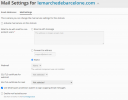
>> Mail service is not enable here because the mail server is not the plesk itself. activting mail service does not change anything.
now the TXT records :
;; ANSWER SECTION:
default._domainkey.lemarchedebarcelone.com. 3600 IN TXT "v=DKIM1;k=rsa; p=MIGfMA0GCSqGSIb3DQEBAQUAA4GNADCBiQKBgQDpKsHYRCle/9TpLN/ex3pg4nJ+rNEv+BYT+9V6VMdJbjcDzJyoLUjfGR3Pr143rOLZ2p6wYrY5DVol7exPSlfB+G2rgaPJqwoEjZa0zGPgfezDsQG0xKGA3J4JLP0+AdwF+kOvqzB1QhxIcOZnIauopEEJEE76aCQ9YBi3pxlxJQIDAQAB;"
the key has been generated as per followinw the guide.
But testing in DKIM, SPF, and Spam Assassin Validator - dkimvalidator.com, the result is DKIM=none. checking source of mail in hotmail is saying dkim=none (message not signed)
so not either saying that dkim key is wrong ! just dkim is not working !
and with same configuration, some other domainns of same server are sending dkim signed e-mails !
No way to find way the mails are sent withing being signed.
thx for your lights if I missed something.
Plesk Obsidian
Version 18.0.32
DNS are externals, so I followed this guide : How to get the DKIM public key from Plesk if DNS is not installed?
then, some domains are working and other not with same configuration !
here are some screen of a domain which is not working :
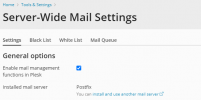
now at domain level :
>> Mail service is not enable here because the mail server is not the plesk itself. activting mail service does not change anything.
now the TXT records :
;; ANSWER SECTION:
default._domainkey.lemarchedebarcelone.com. 3600 IN TXT "v=DKIM1;k=rsa; p=MIGfMA0GCSqGSIb3DQEBAQUAA4GNADCBiQKBgQDpKsHYRCle/9TpLN/ex3pg4nJ+rNEv+BYT+9V6VMdJbjcDzJyoLUjfGR3Pr143rOLZ2p6wYrY5DVol7exPSlfB+G2rgaPJqwoEjZa0zGPgfezDsQG0xKGA3J4JLP0+AdwF+kOvqzB1QhxIcOZnIauopEEJEE76aCQ9YBi3pxlxJQIDAQAB;"
the key has been generated as per followinw the guide.
But testing in DKIM, SPF, and Spam Assassin Validator - dkimvalidator.com, the result is DKIM=none. checking source of mail in hotmail is saying dkim=none (message not signed)
so not either saying that dkim key is wrong ! just dkim is not working !
and with same configuration, some other domainns of same server are sending dkim signed e-mails !
No way to find way the mails are sent withing being signed.
thx for your lights if I missed something.
Plesk Obsidian
Version 18.0.32

