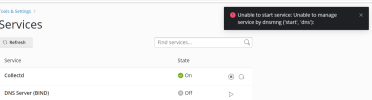
@deleon Could you please check if you find entries related with the keyword "named-checkconf" in your /var/log/messages file? Could you please post the results here?
# grep named-checkconf /var/log/messages
I don't find that keyword.
Here log messages:
Jan 27 23:16:39 server kernel: [ 18.558722] audit: type=1400 audit(1674836193.175:2): apparmor="STATUS" operation="profile_load" profile="unconfined" name="nmbd" pid=523 comm="apparmor_parser"
Jan 27 23:16:39 server kernel: [ 18.589422] audit: type=1400 audit(1674836193.175:3): apparmor="STATUS" operation="profile_load" profile="unconfined" name="syslogd" pid=524 comm="apparmor_parser"
Jan 27 23:16:39 server kernel: [ 18.589428] audit: type=1400 audit(1674836193.175:4): apparmor="STATUS" operation="profile_load" profile="unconfined" name="/usr/sbin/ntpd" pid=519 comm="apparmor_parser"
Jan 27 23:16:39 server kernel: [ 18.589432] audit: type=1400 audit(1674836193.175:5): apparmor="STATUS" operation="profile_load" profile="unconfined" name="/usr/sbin/named" pid=527 comm="apparmor_parser"
Jan 27 23:16:39 server kernel: [ 18.621128] power_meter ACPI000D:00: Found ACPI power meter.
Jan 27 23:16:39 server kernel: [ 18.653899] audit: type=1400 audit(1674836193.175:6): apparmor="STATUS" operation="profile_load" profile="unconfined" name="syslog-ng" pid=522 comm="apparmor_parser"
Jan 27 23:16:39 server kernel: [ 18.687945] power_meter ACPI000D:00: hwmon_device_register() is deprecated. Please convert the driver to use hwmon_device_register_with_info().
Jan 27 23:16:39 server kernel: [ 18.702315] audit: type=1400 audit(1674836193.175:7): apparmor="STATUS" operation="profile_load" profile="unconfined" name="identd" pid=520 comm="apparmor_parser"
Jan 27 23:16:39 server kernel: [ 18.801736] audit: type=1400 audit(1674836193.175:8): apparmor="STATUS" operation="profile_load" profile="unconfined" name="smbldap-useradd" pid=525 comm="apparmor_parser"
Jan 27 23:16:39 server kernel: [ 18.801737] audit: type=1400 audit(1674836193.175:9): apparmor="STATUS" operation="profile_load" profile="unconfined" name="smbldap-useradd///etc/init.d/nscd" pid=525 comm="apparmor_parser"
Jan 27 23:16:39 server kernel: [ 18.801738] audit: type=1400 audit(1674836193.179:10): apparmor="STATUS" operation="profile_load" profile="unconfined" name="klogd" pid=532 comm="apparmor_parser"
Jan 27 23:16:39 server kernel: [ 18.801739] audit: type=1400 audit(1674836193.179:11): apparmor="STATUS" operation="profile_load" profile="unconfined" name="ping" pid=531 comm="apparmor_parser"
Jan 27 23:16:39 server kernel: [ 19.453768] IPv6: ADDRCONF(NETDEV_UP): enp1s0f0: link is not ready
Jan 27 23:16:39 server kernel: [ 22.787886] igb 0000:01:00.0 enp1s0f0: igb: enp1s0f0 NIC Link is Up 1000 Mbps Full Duplex, Flow Control: RX
Jan 27 23:16:39 server kernel: [ 23.348031] IPv6: ADDRCONF(NETDEV_CHANGE): enp1s0f0: link becomes ready
Jan 27 23:16:39 server rsyslogd: imuxsock: Acquired UNIX socket '/run/systemd/journal/syslog' (fd 3) from systemd. [v8.1901.0]
Jan 27 23:16:39 server rsyslogd: [origin software="rsyslogd" swVersion="8.1901.0" x-pid="797" x-info="
The rocket-fast Syslog Server - rsyslog"] start
Jan 28 00:00:00 server rsyslogd: [origin software="rsyslogd" swVersion="8.1901.0" x-pid="797" x-info="
The rocket-fast Syslog Server - rsyslog"] rsyslogd was HUPed
Jan 28 03:47:57 server kernel: [16302.216472] conntrack: generic helper won't handle protocol 47. Please consider loading the specific helper module.

 Facebook
 Twitter