
 Facebook
 Twitter
Hello, we just managed to install Plesk on Ubuntu 22.04 but we are stumbling upon an error with permissions as seen in the screenshot below:
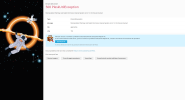
What we are trying to achieve is to have Plesk's installation running on the main drive while having all virtualhosts files on a secondary drive. We tried using the transvhosts utility but it didn't work, we end up with the 500 PleskUtilException seen in the image above. Both drives are using the same file system (ext2) and running Plesk's repair kit doesn't fix the issue.
Other details that could be useful:
- SELinux is running in permissive mode
Thanks in advance for the feedback and support
What we are trying to achieve is to have Plesk's installation running on the main drive while having all virtualhosts files on a secondary drive. We tried using the transvhosts utility but it didn't work, we end up with the 500 PleskUtilException seen in the image above. Both drives are using the same file system (ext2) and running Plesk's repair kit doesn't fix the issue.
Other details that could be useful:
- SELinux is running in permissive mode
Thanks in advance for the feedback and support


