• Debian 11 is approaching its end-of-life (vendor EOL date - August 31, 2026). Plesk Obsidian 18.0.80 will be the last release to support it.
    If you are running Plesk Obsidian on Debian 11, we recommend you upgrade those servers to Debian 12 using our dist-upgrade tool.
  • We plan to deprecate and remove the support for XML RPC protocol versions earlier than 1.6.9.1 in Plesk Obsidian 18.0.82. We strongly recommend that you update all existing integrations using earlier versions of the XML RPC protocol to comply with the version 1.6.9.1 specification.

Resolved Enable NTP on Almalinux 8

The 8th

Regular Pleskian
Server operating system version
Almalinux 8
Plesk version and microupdate number
18.0.56
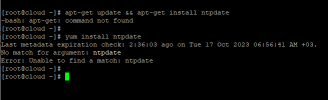
Every time i enable this it's automatically disbaled, addtionally i can't set NTP pool because the field is not exist, i tried most online commands and the result saying no such file in dricotry for NTP.
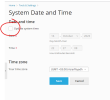
Screenshot 2023-10-17 004306.png
 
@jnasser the option to modify the system is always automatically disabled again saving the modifications. However any time or date modifications should persist after saving.

The ntpdate package is not available for AlmaLinux 8 (or 9). But you can install the Plesk NTP Timesync extension on your server to add automatic data/time synchronization.

Hope this helps.
 
@jnasser the option to modify the system is always automatically disabled again saving the modifications. However any time or date modifications should persist after saving.

The ntpdate package is not available for AlmaLinux 8 (or 9). But you can install the Plesk NTP Timesync extension on your server to add automatic data/time synchronization.

Hope this helps.
Thank you, appreciated, this solved my problem.
 
Back
Top