Follow along with the video below to see how to install our site as a web app on your home screen.
Note: This feature may not be available in some browsers.
The APS Catalog has been deprecated and removed from all Plesk Obsidian versions. Applications already installed from the APS Catalog will continue working. However, Plesk will no longer provide support for APS applications.
Please be aware: with the Plesk Obsidian 18.0.78 release, the support for the ngx_pagespeed.so module will be deprecated and removed from the sw-nginx package.
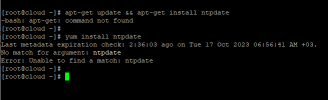
Every time i enable this it's automatically disbaled, addtionally i can't set NTP pool because the field is not exist, i tried most online commands and the result saying no such file in dricotry for NTP.
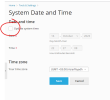
@jnasser the option to modify the system is always automatically disabled again saving the modifications. However any time or date modifications should persist after saving.
The ntpdate package is not available for AlmaLinux 8 (or 9). But you can install the Plesk NTP Timesync extension on your server to add automatic data/time synchronization.
@jnasser the option to modify the system is always automatically disabled again saving the modifications. However any time or date modifications should persist after saving.
The ntpdate package is not available for AlmaLinux 8 (or 9). But you can install the Plesk NTP Timesync extension on your server to add automatic data/time synchronization.