Facebook
 Twitter
Short question. I installed PHP version 8.05 on my server (Updates > Add/Remove Components).
I go to Tools & Settings > Server Management > Services Management
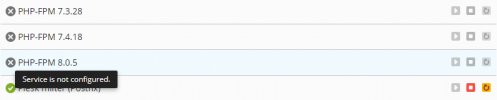
I see 3 PHP-versions listed. One of 'em is the one I just installed (8.05). All versions are disabled and can't be enabled.
I do not have any customers/domains/subscriptions/service plans installed yet. So it's an 'empty' server. Is that the reason why I can't enable PHP? Or is something wrong?
I go to Tools & Settings > Server Management > Services Management
I see 3 PHP-versions listed. One of 'em is the one I just installed (8.05). All versions are disabled and can't be enabled.
I do not have any customers/domains/subscriptions/service plans installed yet. So it's an 'empty' server. Is that the reason why I can't enable PHP? Or is something wrong?
Last edited: