Follow along with the video below to see how to install our site as a web app on your home screen.
Note: This feature may not be available in some browsers.
The APS Catalog has been deprecated and removed from all Plesk Obsidian versions. Applications already installed from the APS Catalog will continue working. However, Plesk will no longer provide support for APS applications.
Please be aware: with the Plesk Obsidian 18.0.78 release, the support for the ngx_pagespeed.so module will be deprecated and removed from the sw-nginx package.
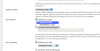
I recently checked your scenario and I think that permission "Common PHP settings management" will solve you issue.
Just grant it in service plan and PHP settings will not be overridden.
Hi,
I run a magento website on my 1&1 VPS running plesk 10.4 . I wanted to disable open_basedir because it is said that improves the performance of websites based on Magento. As it seems to be a issue with this procedure on plesk 10.4, I update to plesk 11.09. But I the problems is still present.
I cant set open_basedir to "none", or disable it through php.
Hi,
I run a magento website on my 1&1 VPS running plesk 10.4 . I wanted to disable open_basedir because it is said that improves the performance of websites based on Magento. As it seems to be a issue with this procedure on plesk 10.4, I update to plesk 11.09. But I the problems is still present.
I cant set open_basedir to "none", or disable it through php.
Hi,
I run a magento website on my 1&1 VPS running plesk 10.4 . I wanted to disable open_basedir because it is said that improves the performance of websites based on Magento. As it seems to be a issue with this procedure on plesk 10.4, I update to plesk 11.09. But I the problems is still present.
I cant set open_basedir to "none", or disable it through php.
If you're comfortable with doing it outside of the Plesk interface, you can edit the /var/www/vhosts/DOMAIN/etc/php.ini file to set it to none; I think the reason that doesn't work from within Plesk is because they're quoting the "none" which makes php treat it as a path. The only close equivalent within Plesk would be to set it to / but then it's still effectively enabled, just not doing anything useful.
If you do go the hand edit route, you may want to change the permissions on the php.ini file to prevent Plesk from replacing it or your settings could get wiped out.
Hi,
I run a magento website on my 1&1 VPS running plesk 10.4 . I wanted to disable open_basedir because it is said that improves the performance of websites based on Magento. As it seems to be a issue with this procedure on plesk 10.4, I update to plesk 11.09. But I the problems is still present.
I cant set open_basedir to "none", or disable it through php.
The only way is to use Plesk 9.x I also do not understand why parallel upgrade Plesk version but to one such silly errors occur.I tried to contact the support of the parallels that can not be.They require payment for technical support, while this is their fault.