Facebook
 Twitter
Peter Gossett
New Pleskian
TITLE:
Error in WordPress Installations
PRODUCT, VERSION, OPERATING SYSTEM, ARCHITECTURE:Plesk Onyx Version 17.8.9 CentOS Linux 7.4.1708 (Core)
PROBLEM DESCRIPTION:I am getting an error when I attempt to access any WordPress installations in Plesk. The error I'm getting is:
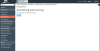
Cannot find module './i-filter-check-mark.png'.
Screenshot of error:

STEPS TO REPRODUCE:
ACTUAL RESULT:
Cannot find module './i-filter-check-mark.png'.
Screenshot of error:
STEPS TO REPRODUCE:
- Open subscription
- Click WordPress installation

Something went wrong.
Cannot find module './i-filter-check-mark.png'.

EXPECTED RESULT:Cannot find module './i-filter-check-mark.png'.
WordPress installation preferences / settings
ANY ADDITIONAL INFORMATION:
YOUR EXPECTATIONS FROM PLESK SERVICE TEAM:Help with sorting out
Attachments
Last edited: