• The new Python extension is now available. It allows customers to deploy and manage WSGI-based Python applications on their websites directly from Plesk.
  • Debian 11 has reached its end-of-life (vendor EOL date - August 31, 2026). Plesk Obsidian 18.0.81 is the last release to support it.
    If you are running Plesk Obsidian on Debian 11, we recommend you upgrade those servers to Debian 12 using our dist-upgrade tool.
  • We plan to deprecate and remove the support for XML RPC protocol versions earlier than 1.6.9.1 in Plesk Obsidian 18.0.82. We strongly recommend that you update all existing integrations using earlier versions of the XML RPC protocol to comply with the version 1.6.9.1 specification.

Error in WordPress Installations

Peter Gossett

New Pleskian
TITLE:
Error in WordPress Installations​
PRODUCT, VERSION, OPERATING SYSTEM, ARCHITECTURE:
Plesk Onyx Version 17.8.9 ‪CentOS Linux 7.4.1708 (Core)‬​
PROBLEM DESCRIPTION:
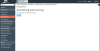
I am getting an error when I attempt to access any WordPress installations in Plesk. The error I'm getting is:

Cannot find module './i-filter-check-mark.png'.

Screenshot of error:
d7c4ae83b7b9cb4c239dc026ce8c5b63.jpg


STEPS TO REPRODUCE:
  1. Open subscription
  2. Click WordPress installation
    095e515ada47846df2b8d01b80087552.jpg
ACTUAL RESULT:
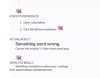
Something went wrong.
Cannot find module './i-filter-check-mark.png'.
2d5ca01fe22c11796043a5474aad5995.jpg

​
EXPECTED RESULT:
WordPress installation preferences / settings​
ANY ADDITIONAL INFORMATION:
​
YOUR EXPECTATIONS FROM PLESK SERVICE TEAM:
Help with sorting out​
 

Attachments

  • Screen Shot 2018-03-07 at 8.56.10 AM.png
    Screen Shot 2018-03-07 at 8.56.10 AM.png
    125.8 KB · Views: 5
  • Screen Shot 2018-03-07 at 8.59.50 AM.png
    Screen Shot 2018-03-07 at 8.59.50 AM.png
    63.1 KB · Views: 8
Last edited:
Please update your report with correct screenshots.
Thanks.
 
Plesk doesn't contain the file with name i-filter-check-mark.png. So, it looks like misconfiguration on your server. Do you have Node.js installed on this domain?
 
Back
Top