
 Facebook
 Twitter
linuxKurt
Basic Pleskian
- Server operating system version
- ubuntu 22.04
- Plesk version and microupdate number
- 18.0
I am on my fourth migration trial today. I am scheduled to do a Production Migration this evening.
I went into the server and started the Plesk Migrator Extension and I am getting this error. I successfully ran a migration on this server 3 days ago and nothing really has changed surrounding the server or anything installed on it. After the migration we did some WordPress and vBulletin configurations, but did nothing related to PHP or anything that was installed when the migrator ran.
I checked today and python3-paramiko is installed and the newest version. I am not sure where to go from here. Maybe Plesk Migrator is looking for a different version?

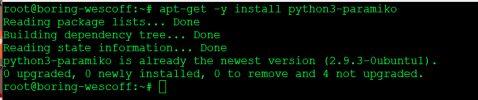
I went into the server and started the Plesk Migrator Extension and I am getting this error. I successfully ran a migration on this server 3 days ago and nothing really has changed surrounding the server or anything installed on it. After the migration we did some WordPress and vBulletin configurations, but did nothing related to PHP or anything that was installed when the migrator ran.
I checked today and python3-paramiko is installed and the newest version. I am not sure where to go from here. Maybe Plesk Migrator is looking for a different version?


