• The APS Catalog has been deprecated and removed from all Plesk Obsidian versions.
    Applications already installed from the APS Catalog will continue working. However, Plesk will no longer provide support for APS applications.
  • Please be aware: with the Plesk Obsidian 18.0.78 release, the support for the ngx_pagespeed.so module will be deprecated and removed from the sw-nginx package.

Issue Error messages with let's Encrypt when 1 serveur for main domain and another serveur for subdomain or mails

kristobal1969

Basic Pleskian
Server operating system version
Ubuntu 22.04.5 LTS
Plesk version and microupdate number
Plesk Obsidian 18.0.77 Update #2
Hello,
I receive each day a message from Plesk telling that the domain is not secured though it is (on all domain and subdomains).
in this exaple ngpark.fr and www.ngpark.fr are on the server with ip 217.160.0.52. They have their own certificate on that server (i do not manage this server). but though I have not asked for a certificate on ngpark.fr or www I have this message
Plesk
Could not secure domains of Nicolas Durand (login NGPark) with Let`s Encrypt certificates. Please log in to Plesk and secure the domains listed below manually.
Securing of the following domains has failed:

** 'ngpark.fr' **
Invalid response from https://acme-v02.api.letsencrypt.org/acme/authz/2019333767/698598105185
Details:
Type: urn:ietf:params:acme:error:unauthorized
Status: 403
Detail: 217.160.0.52: Invalid response from http://ngpark.fr/.well-known/acme-challenge/2Pb1rzSBssv7M-43N2sJKw3_CXoBCnGotYTu3oumIqs: 204

The following domains have been secured without some of their Subject Alternative Names:

<none>

Could not renew Let`s Encrypt certificates for Nicolas Durand (login NGPark). Please log in to Plesk and renew the certificates listed below manually.
Renewal of the following Let`s Encrypt certificates has failed:

<none>

The following Let`s Encrypt certificates have been renewed without some of their Subject Alternative Names:

<none>​

For full explanation here are the DNS of my provider (bookmyname/scaleway) :
@ 300 A 217.160.0.52
www 500 A 217.160.0.52
mail 500 A 212.83.185.154
webmail 500 A 212.83.185.154


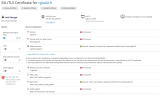
and here in plesk the certificate in the attached files.

I hope someone can tell me how to get rid of these messages because it is every day and I have 2 domains in this case where I only manage the mail of the domains.


Regards.
Kris
 

Attachments

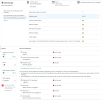
  • installation of certifcate on my server.png
    installation of certifcate on my server.png
    104.6 KB · Views: 3
  • result after installation.png
    result after installation.png
    185.3 KB · Views: 3
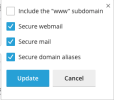
  • selction of what is protected.png
    selction of what is protected.png
    14.3 KB · Views: 3
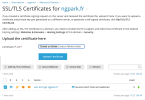
No, just 1 line with 3 used. But I can not remove because it is in used.
It should be only 2 I think for webmail mai.ngpark.fr and the mails
 

Attachments

  • ScreenShot 2026-05-05 à 16.30.15.png
    ScreenShot 2026-05-05 à 16.30.15.png
    89.8 KB · Views: 3
Thank you. Can you please try re-issuing the certificate from Subscriptions > example.com > SSL/TLS Certificates and make sure that the "Secure the domain name", "Secure the wildcard domain (including www and webmail)", and "Include a "www" subdomain for the domain and each selected alias" options are excluded?
 
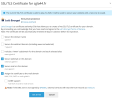
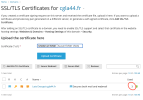
Ok I have just done it for another domain cgla44.fr in order to see if I get a message tomorrow. here is what I have done.
This is what I did before with ngpark.fr
see tomorrow !
 

Attachments

  • Capture d’écran 2026-05-05 à 21.01.33.png
    Capture d’écran 2026-05-05 à 21.01.33.png
    282.8 KB · Views: 3
Hello,
Well, this morning here is what I received by mail following the creation of the new certificate as asked yesterday (applied on domain cgla44.fr see my post just before this one). I am not surprised as I have applied the same way the certificate months ago many times. Of course another mail like my first post for ngpark.fr has arrived too.
Here is the message for cgla44.fr :

Plesk
Could not secure domains of Jack Béty (login CGLA44) with Let`s Encrypt certificates. Please log in to Plesk and secure the domains listed below manually.
Securing of the following domains has failed:

** 'cgla44.fr' **
Invalid response from https://acme-v02.api.letsencrypt.org/acme/authz/2019333767/698808299865
Details:
Type: urn:ietf:params:acme:error:unauthorized
Status: 403
Detail: 2620:1ec:bdf::38: Invalid response from https://www.cgla44.fr/.well-known/acme-challenge/GOt09u0yR88Q3UgFoxkNkKSLrwN9sw6LPrBe2poSN8k:404

The following domains have been secured without some of their Subject Alternative Names:

<none>

Could not renew Let`s Encrypt certificates for Jack Béty (login CGLA44). Please log in to Plesk and renew the certificates listed below manually.
Renewal of the following Let`s Encrypt certificates has failed:

<none>

The following Let`s Encrypt certificates have been renewed without some of their Subject Alternative Names:

<none>​

here are the DNS on my registrar's side :
www 500 CNAME assoconnect-11.azurefd.net.
webmail 500 A 212.83.185.154
mail 500 A 212.83.185.154
@ 500 MX 10 cgla44.fr.
cgla44.fr. 500 MX 10 cgla44.fr.
cgla44.fr. 500 TXT "v=spf1 mx a:cgla44.fr a:graphicom.fr a:graphicom.eu ip4:212.83.185.154 ip4:163.172.32.69 -all"
_domainkey.cgla44.fr. 500 TXT "o=-"
default._domainkey.cgla44.fr. 500 TXT "v=DKIM1; p=MIIBIjANBgkqhkiG9w0BAQEFAAOCAQ8AMIIBCgKCAQEA3s+Ux84y1oENFD73YS53IloQySTyYlmibpuq1HR83hAm61LPX24BkjyoCl6N+RQTBcDa0UGmCONYQzUt4tgPdKrx1Cndyxq0Se9AgEBtOUx5pFioDlc8rV95q3ve40jsIXL51iGdx4DiW/iz3jtjgnARHd+8Ot0FeQfa0SJHBSLmxT7ZtSA0AMLydX60cZYSorwwTNmW0aI02pO6bP6T0sZY8PoMUat3JWE9eOx3r1ZxTLguwwkyjx7hM2QSJG5ruHZYdBPo5qKkf898n9vIKSjIq/yimkrYvGuljJ5i0XZHQsxpnKS10pIUwUlxjtFTyEfMnhakb5zyUyODTwL3pQIDAQAB;"
_dmarc.cgla44.fr. 500 TXT "v=DMARC1; p=quarantine; adkim=s; aspf=s"
cgla44.fr. 500 CAA 0 issue "digicert.com"
cgla44.fr. 500 CAA 0 issue "letsencrypt.org"


I hope you can see something that is wrong in all this. What about doing that on your side for one domain in order to see if it is not something normal (but annoying).

Regards
 
Hello,

I suppose these messages are sent because Keep websites secured option is enabled. As a result, SSL It! attempts to secure the domain name.
Please note that this option is not required for certificates auto-renewal. So, in case you do not expect new domains to be automatically secured within this subscription, it can be switched off.
 
Hello NataliA,
I really thought that it needed to be enabled in order to keep and renew the certificate once it is the end.
Thank you for your informations (which is strange). I disabled it on one of the 2 domains that have 2 servers and I will let you know.
I come back tomorrow :p
 
Oh no !!!!
Still there ! Another idea ?

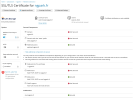
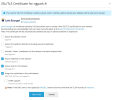
What i can say is that I am surprised that I get 3 domains instead of 2 (mail and webmail) (see screenshot). There could be the problem. But I can not remove the certificate there it says it is in use.

So I have just unassigned the certificate instead of renewing it (what I did before) and I have then only 2. I hope and believe it is the solution.
Will be back tomorrow to tell you.

Plesk
Could not secure domains of Jack Béty (login CGLA44) with Let`s Encrypt certificates. Please log in to Plesk and secure the domains listed below manually.
Securing of the following domains has failed:

** 'cgla44.fr' **
Invalid response from https://acme-v02.api.letsencrypt.org/acme/authz/2019333767/699386573045
Details:
Type: urn:ietf:params:acme:error:unauthorized
Status: 403
Detail: 2620:1ec:46::38: Invalid response from https://www.cgla44.fr/.well-known/acme-challenge/QoKxaSQaWhvrnWoM8HdAkd8c7mK-KufNSx1JSAfXEOA: 404

The following domains have been secured without some of their Subject Alternative Names:

<none>

Could not renew Let`s Encrypt certificates for Jack Béty (login CGLA44). Please log in to Plesk and renew the certificates listed below manually.
Renewal of the following Let`s Encrypt certificates has failed:

<none>

The following Let`s Encrypt certificates have been renewed without some of their Subject Alternative Names:

<none>​
 

Attachments

  • ScreenShot 2026-05-07 à 09.57.09.png
    ScreenShot 2026-05-07 à 09.57.09.png
    89.6 KB · Views: 0
More info.
I see in this new certifcate : "Secured : Webmail is secured by a separate certificate Lets Encrypt cgla44.fr" whereas with ngpark.fr that I have not unassigned I can read "Secured".
We are close to the solution
 

Attachments

  • ScreenShot 2026-05-07 à 10.10.17.png
    ScreenShot 2026-05-07 à 10.10.17.png
    161 KB · Views: 1
  • ScreenShot 2026-05-07 à 10.10.49.png
    ScreenShot 2026-05-07 à 10.10.49.png
    164.5 KB · Views: 1
That can also be the reason, you are right. It may be caused by SSL it! attempting to secure the domain name previously.
Please try going to ngpark.fr > Hosting & DNS > Hosing > SSL/TLS support and setting the Certificate field to Not selected.
 
Back
Top