
 Facebook
 Twitter
alexandergoya
New Pleskian
Hello all,
I'm attempting to change the default vhosts directory such that user data will be stored on a separate drive. I've mounted a 200gb drive to /var/opt, and wish the default vhosts directory to be /var/opt/www/vhosts. I'm getting the following error:
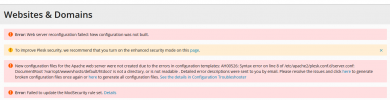
I've tried using #plesk bin transvhosts.pl --dest-dir /var/opt/www/vhosts --correct scripts, as well as editing the psa.conf file to do this. It appears as though plesk is repeatedly unable to create the nessiary files and directories.
I've set the permissions to /var/opt as 777 in order to debug, but still no luck.
I've also attempted to fix it by running the #sudo plesk repair fs, and receive the following error (/var/opt/www/vhosts does in fact exist, I manually created it):
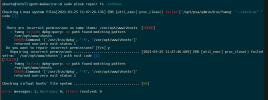
Here is the list of drives:
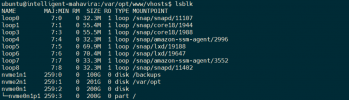
Any assistance would be appreciated
I'm attempting to change the default vhosts directory such that user data will be stored on a separate drive. I've mounted a 200gb drive to /var/opt, and wish the default vhosts directory to be /var/opt/www/vhosts. I'm getting the following error:
I've tried using #plesk bin transvhosts.pl --dest-dir /var/opt/www/vhosts --correct scripts, as well as editing the psa.conf file to do this. It appears as though plesk is repeatedly unable to create the nessiary files and directories.
I've set the permissions to /var/opt as 777 in order to debug, but still no luck.
I've also attempted to fix it by running the #sudo plesk repair fs, and receive the following error (/var/opt/www/vhosts does in fact exist, I manually created it):
Here is the list of drives:
Any assistance would be appreciated


