• The new Python extension is now available. It allows customers to deploy and manage WSGI-based Python applications on their websites directly from Plesk.
  • The Plesk Mobile apps for iOS and Android and the Plesk Mobile Center extension have been deprecated, and are no longer available for new installations. In Plesk Obsidian 18.0.84, the Plesk Mobile Center extension will be removed from servers during the upgrade, and the Plesk Mobile apps will lose their server management features.
  • The Social Login extension has been deprecated and will be removed in Plesk Obsidian 18.0.84. After that, it will no longer be possible to log in to Plesk with a Google, Facebook, GitHub account, or with a passkey. Plesk usernames and passwords, as well as logging in with a WebPros Account, are not affected.

Question ETA for critical PHP security updates (CVE-2026-109618 / CVE-2026-109619)?

"... Since this setup is unlikely in practice, ..."
Really? Hackers will just upload their own script that configures the system the way they want it, then start the attack.

One strategy would be to set

in the additional directives, so that the value cannot be changed by the subscription owner via an .ini file. It will end up in the /opt/plesk/php/<version>/etc/php-fpm.d/*.conf file of the domain. But that can be tedious if you have many domains on a server as it needs to be done on a "per domain" basis.

Another solution can be

That will set the variable for all PHP instances using that version while it disables user .ini files altogether. As the session.upload_progress variable cannot be set by ini_set() it will keep an attacker from making the environment fit a malicious purpose.

Opinions on this?

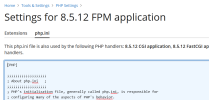
Is it not as simple as adding/amending to session.upload_progress.enabled=0 the php.ini for each version handler?
1792770908205.png
 
One strategy would be to set
in the additional directives, so that the value cannot be changed by the subscription owner via an .ini file. It will end up in the /opt/plesk/php/<version>/etc/php-fpm.d/*.conf file of the domain. But that can be tedious if you have many domains on a server as it needs to be done on a "per domain" basis.

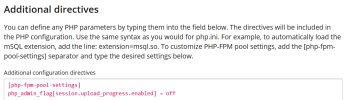
Okay, for people who want a GUI method, I think this can be applied at the Service Plan level. Head to the PHP Settings tab, and scroll down to Additional directives.

Warning though, if a subscription is locked it won't sync this change, so you have to unlock for syncing or set up a new service plan and pull the locked subscriptions over to the new service plan.

1792774094378.png

Code:
[php-fpm-pool-settings]
php_admin_flag[session.upload_progress.enabled] = off

phpinfo() check.

1792774206417.png
 
Okay, for people who want a GUI method, I think this can be applied at the Service Plan level. Head to the PHP Settings tab, and scroll down to Additional directives.
However, this appears to deactivate and disable the ability to use Performance Booster for PHP, implying possible overwrite of existing Additional Directives at the domain level. Order of actions needs testing.

1792776260757.png
 
I think the focus will remain on PHP for a while longer now that even the mainstream news has covered it. Node.js, Java, and the others managed to stay under the radar, even though they also had major vulnerabilities—or take, for example, the Pip issue surrounding Python and the eMudhra/certifi package.
 
One strategy would be to set
in the additional directives, so that the value cannot be changed by the subscription owner via an .ini file. It will end up in the /opt/plesk/php/<version>/etc/php-fpm.d/*.conf file of the domain. But that can be tedious if you have many domains on a server as it needs to be done on a "per domain" basis.

Is there a reason why:

INI:
[php-fpm-pool-settings]
php_admin_flag[session.upload_progress.enabled] = off

is ignored in php.ini for the handler and ignored in panel.ini? Is [php-fpm-pool-settings] with php_admin_flag in these places something to be considered for development? I think this would be super helpful for admins. @Sebahat.hadzhi, any insight?
 
I'd really like it if someone from Plesk would comment on the session.upload_progress.enabled=0 issue and, perhaps, add a support article with a supported and recommended way to proceed.
 
@Bobbbb , setting session.upload_progress.enabled=0 can mitigate the vulnerability until an update is released by PHP. You can adjust the PHP configuration on a domain/service plan or globally according to this article. There isn't really a recommended approach for this particular directive. Global per-version config is probably the most convenient approach and as mentioned earlier in this thread subscription users won't be able to change it on their own.
 
Regarding the Brotli desaster I want to make you aware that updating the libraries won't be enough (e.g. when your operating system updates them). You'll also need to restart the services that depend on them, and this also applies to the service if it only links dynamically to the Brotli library. The reason is that services load the library when they start. If the library is updated, it does not change in the memory of the service, so the service still uses the previous version that can be attacked.

What you should restart is definitely all php-fpm services. What you normally do not need to restart are Nginx and Apache, as both route incoming traffic through to the endpoint without decompressing it. If you are using Node, Ruby, Bun etc., restarts are required.

On the command line, I'd suggest to run python3 -c "import pkg_resources; [print(f'{d.project_name}: {d.version}') for d in pkg_resources.working_set if d.project_name.lower() in ['brotli', 'brotlicffi']]" once, just to make sure that your Python does not use the Brotli package by default. No output = no problem.

Finally, another piece of unasked advice: Your distributor might backport the updated Brotli files, so that they still carry version numbers that appear to be affected by the flaw. However, you can find out what the real update status is by querying the package manager, for example for Alma/RHEL it would be
rpm -q --changelog brotli | grep -i "CVE-2026-111497" or to see the first few lines rpm -q --changelog brotli | head -n 5.
 
Regarding the Brotli desaster I want to make you aware that updating the libraries won't be enough (e.g. when your operating system updates them). You'll also need to restart the services that depend on them, and this also applies to the service if it only links dynamically to the Brotli library. The reason is that services load the library when they start. If the library is updated, it does not change in the memory of the service, so the service still uses the previous version that can be attacked.

What you should restart is definitely all php-fpm services. What you normally do not need to restart are Nginx and Apache, as both route incoming traffic through to the endpoint without decompressing it. If you are using Node, Ruby, Bun etc., restarts are required.

On the command line, I'd suggest to run python3 -c "import pkg_resources; [print(f'{d.project_name}: {d.version}') for d in pkg_resources.working_set if d.project_name.lower() in ['brotli', 'brotlicffi']]" once, just to make sure that your Python does not use the Brotli package by default. No output = no problem.

Finally, another piece of unasked advice: Your distributor might backport the updated Brotli files, so that they still carry version numbers that appear to be affected by the flaw. However, you can find out what the real update status is by querying the package manager, for example for Alma/RHEL it would be
rpm -q --changelog brotli | grep -i "CVE-2026-111497" or to see the first few lines rpm -q --changelog brotli | head -n 5.
I started a separate thread for the Brotli CVE Issue - Brotli CVE-2026-111497
 
Next vulnerability—no Ubuntu fix available yet. So I've temporarily patched it as follows:

Code:
sudo nft add table inet cve_2026_98432
sudo nft 'add chain inet cve_2026_98432 input { type filter hook input priority -310; policy accept; }'
sudo nft add rule inet cve_2026_98432 input ip protocol tcp ip hdrlength gt 5 counter drop
sudo nft list table inet cve_2026_98432


This disables IP Options, which you generally don't need for a web server anyway. However, this setting isn't persistent, so it won't survive a reboot.
 
Back
Top