• Halloween is coming! To celebrate the occasion, we dusted off a couple of old skins, and even created a brand new one (Pixel).
    To get into the festive spirit, install the Skins extension.
  • The new Python extension is now available. It allows customers to deploy and manage WSGI-based Python applications on their websites directly from Plesk.
  • The Plesk Mobile apps for iOS and Android and the Plesk Mobile Center extension have been deprecated, and are no longer available for new installations. In Plesk Obsidian 18.0.84, the Plesk Mobile Center extension will be removed from servers during the upgrade, and the Plesk Mobile apps will lose their server management features.
  • The Social Login extension has been deprecated and will be removed in Plesk Obsidian 18.0.84. After that, it will no longer be possible to log in to Plesk with a Google, Facebook, GitHub account, or with a passkey. Plesk usernames and passwords, as well as logging in with a WebPros Account, are not affected.

Issue "Failed to fetch" when run Reverse Proxy Server (nginx) service

pba

New Pleskian
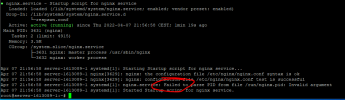
Hi, when I try to start (or stop) the Reverse Proxy Server (nginx) service, I get the message: "Failed to fetch"
then the switch indicates that the service is running, the same is done when trying to stop the service.
How to check if the service has been properly started or stopped?

 

Attachments

  • nginx.PNG
    nginx.PNG
    21.7 KB · Views: 6
Run # systemctl status nginx command via SSH to view status of Nginx.

If Nginx is running it should return something like:
Code:
...
Active: active (running) since di 2022-03-29 12:00:40 CEST; 1 weeks 2 days ago
...
 
Apparently it's a known bug on Nginx when running Ubuntu 18.04. From what I understand it doesn't impact the use of Nginx. #1952 (systemd[1]: nginx.service: Failed to parse PID from file /run/nginx.pid: Invalid argument) – nginx

There is a Workaround suggested. But if your Nginx is running fine I would not bother.
Bash:
  sudo mkdir /etc/systemd/system/nginx.service.d
  printf "[Service]\nExecStartPost=/bin/sleep 0.1\n" | \
    sudo tee /etc/systemd/system/nginx.service.d/override.conf
  sudo systemctl daemon-reload
  sudo systemctl restart nginx
 
@Rasp
I'm using Debian :)
I was more concerned about the bug from the first post, but everything seems to be working
 
Back
Top