• Debian 11 is approaching its end-of-life (vendor EOL date - August 31, 2026). Plesk Obsidian 18.0.80 will be the last release to support it.
    If you are running Plesk Obsidian on Debian 11, we recommend you upgrade those servers to Debian 12 using our dist-upgrade tool.
  • We plan to deprecate and remove the support for XML RPC protocol versions earlier than 1.6.9.1 in Plesk Obsidian 18.0.82. We strongly recommend that you update all existing integrations using earlier versions of the XML RPC protocol to comply with the version 1.6.9.1 specification.

Issue "Failed to fetch" when run Reverse Proxy Server (nginx) service

pba

New Pleskian
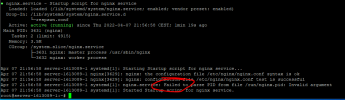
Hi, when I try to start (or stop) the Reverse Proxy Server (nginx) service, I get the message: "Failed to fetch"
then the switch indicates that the service is running, the same is done when trying to stop the service.
How to check if the service has been properly started or stopped?

 

Attachments

  • nginx.PNG
    nginx.PNG
    21.7 KB · Views: 6
Run # systemctl status nginx command via SSH to view status of Nginx.

If Nginx is running it should return something like:
Code:
...
Active: active (running) since di 2022-03-29 12:00:40 CEST; 1 weeks 2 days ago
...
 
Apparently it's a known bug on Nginx when running Ubuntu 18.04. From what I understand it doesn't impact the use of Nginx. #1952 (systemd[1]: nginx.service: Failed to parse PID from file /run/nginx.pid: Invalid argument) – nginx

There is a Workaround suggested. But if your Nginx is running fine I would not bother.
Bash:
  sudo mkdir /etc/systemd/system/nginx.service.d
  printf "[Service]\nExecStartPost=/bin/sleep 0.1\n" | \
    sudo tee /etc/systemd/system/nginx.service.d/override.conf
  sudo systemctl daemon-reload
  sudo systemctl restart nginx
 
@Rasp
I'm using Debian :)
I was more concerned about the bug from the first post, but everything seems to be working
 
Back
Top