Facebook
 Twitter
mahmut ozdemir
Basic Pleskian
Hi everyone,
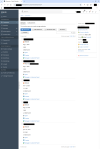
After upgrading to the latest Plesk Obsidian 18.0.78, we noticed a significant visual regression in the File Manager interface.
In the previous version (18.0.77), the file lists, rows, and columns were perfectly aligned, well-padded, and highly readable. However, in version 18.0.78, the vertical alignment and padding of the rows are completely broken.
Problems observed:
We would highly prefer the clean, properly spaced, and organized layout of the older version back. Is anyone else experiencing this CSS layout bug after the latest update?
Hopefully, the UI/UX team can review this regression and deploy a fix in the next hotfix or micro-update.
Thank you.
Plesk Obsidian 18.0.78
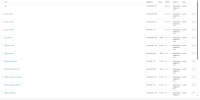
Plesk Obsidian 18.0.77
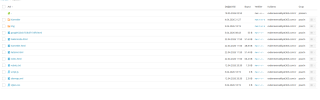
I just saw this I think it's the same topic and problem.
 talk.plesk.com
After upgrading to the latest Plesk Obsidian 18.0.78, we noticed a significant visual regression in the File Manager interface.
In the previous version (18.0.77), the file lists, rows, and columns were perfectly aligned, well-padded, and highly readable. However, in version 18.0.78, the vertical alignment and padding of the rows are completely broken.
Problems observed:
- The rows are vertically compressed; file names, permissions, sizes, and user/group columns are sticking to the edges of the row borders.
- The lack of proper CSS padding/margin makes the File Manager look cluttered and hard to read, especially when managing directories with many files.
- Elements inside the rows are not vertically centered anymore.
We would highly prefer the clean, properly spaced, and organized layout of the older version back. Is anyone else experiencing this CSS layout bug after the latest update?
Hopefully, the UI/UX team can review this regression and deploy a fix in the next hotfix or micro-update.
Thank you.
Plesk Obsidian 18.0.78
Plesk Obsidian 18.0.77
I just saw this
I think it's the same topic and problem.Forwarded to devs - [BUG] Plesk 18.0.77 – File Manager list view broken for psaserv-owned directories
Server OS: Ubuntu 24.04.4 LTS Plesk version: 18.0.77 Update #1 Web Pro Edition SYMPTOMS: File Manager list view displays metadata (date, permissions, owner, group) in broken vertical layout for directories owned by group "psaserv". Directories with group "psacln" display correctly. REPRODUCE...
talk.plesk.com