
 Facebook
 Twitter
Virtual Expertise
New Pleskian
Hello,
I'm new to Plesk but I already like it so much
It's a fresh install with Plesk 12.0 and Ubuntu, I didn't modify anything on configuration.
When I follow the documentation to add my domain email account to Thunderbird everythings works fine :
POP
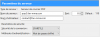
SMTP

When i want to do the same in Gmail, it's OK I can check my emails with POP but the smtp is not working.
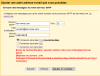
I tried every combo, every ports but nothing works...
Here is the info for the manual configuration given by Plesk :
Manual Setup
Mail server username: [email protected]
Incoming mail server: fan-mma.com
Outgoing mail server: fan-mma.com (server requires authentication)
Supported incoming mail protocols: POP3, IMAP
Supported outgoing mail protocols: SMTP
I'm new to Plesk but I already like it so much
It's a fresh install with Plesk 12.0 and Ubuntu, I didn't modify anything on configuration.
When I follow the documentation to add my domain email account to Thunderbird everythings works fine :
POP
SMTP
When i want to do the same in Gmail, it's OK I can check my emails with POP but the smtp is not working.
I tried every combo, every ports but nothing works...
Here is the info for the manual configuration given by Plesk :
Manual Setup
Mail server username: [email protected]
Incoming mail server: fan-mma.com
Outgoing mail server: fan-mma.com (server requires authentication)
Supported incoming mail protocols: POP3, IMAP
Supported outgoing mail protocols: SMTP
